

A founder who answers every customer message from one phone does not have the same problem as a 25-person sales and service team. Yet both are often told they need “the WhatsApp API” without first deciding how work should move through the business.
There are three different decisions hiding inside that phrase:
- which WhatsApp product carries the conversation;
- how multiple employees access and manage that conversation; and
- where the customer record, ownership and follow-up live.
The WhatsApp Business App, the WhatsApp Business Platform and a WhatsApp CRM address different parts of that operating model. They can complement one another, but they are not interchangeable.
The practical distinction
The WhatsApp Business App is an app-based experience for businesses, suited to a relatively simple communication setup. The WhatsApp Business Platform is Meta’s programmatic business-messaging infrastructure, used through Cloud API or a provider. A WhatsApp CRM is the layer that connects conversations to customer context and accountable business work.
One is an app. One is channel infrastructure. One is an operating system for the customer relationship.
That final layer may integrate with the Platform; it does not replace Meta’s policies or delivery infrastructure. Meta’s WhatsApp Business Messaging Policy applies to businesses using both the App and the Platform, including requirements around consent and acceptable messaging.
A decision matrix for growing teams
| Operating need | Business App | Business Platform | WhatsApp CRM |
|---|---|---|---|
| A small setup answering from an app | Strong fit | Usually unnecessary by itself | Optional until ownership becomes hard to track |
| Programmatic sending and receiving | Not its main role | Core capability | Uses an integration rather than replacing the Platform |
| Several people working from a governed team inbox | Limited operating model | Enables the channel connection | Organises assignment, context and follow-up |
| Business-initiated messages at scale | Limited and policy-bound | Supports approved template workflows | Helps decide who should be contacted and what replies create |
| Contact and company history | Basic business communication context | Not a complete CRM record | Core capability |
| Deals, tasks, quotations and due actions | Outside the channel’s main job | Outside the channel infrastructure’s main job | Core operating purpose |
| Management view of unattended work | Limited | Must be built or supplied by software | Should be visible through inbox and work records |
| Best starting point | Owner-led or very small operation | Business with an approved programmatic use case | Team that needs shared context and accountable customer work |
The table is not a maturity ladder. A local professional firm can run well on the Business App if one or two people genuinely own all customer work. A larger operation may need the Platform but still have poor follow-up because the surrounding process is weak.
When the WhatsApp Business App is enough
The Business App is often a sensible starting point when:
- one person or a very small number of people manage the business number;
- the daily message volume remains understandable without a queue;
- customer matters are resolved within the conversation;
- few enquiries require multi-step sales or service coordination; and
- the owner can reliably see what is pending.
Imagine a two-person design studio. Most messages concern appointment times, simple questions and updates on current projects. The founders know every active client and discuss the day’s work together. A CRM could help later, but introducing a complex workflow now may add administration without fixing a real failure.
The trigger to reconsider is not a fashionable team-size threshold. It is repeated ambiguity. If both founders assume the other replied, if project details have to be searched from old chats or if serious enquiries disappear beneath routine messages, the operating model has outgrown the app-led process.
What the WhatsApp Business Platform changes
The Platform allows businesses and software providers to build messaging into a broader workflow. In Meta’s Cloud API overview, the API is described as a way for businesses to communicate programmatically through WhatsApp.
That capability comes with rules. Businesses need appropriate customer opt-in. On the Platform, business-initiated conversations use approved message templates; free-form responses are available within the permitted customer-service window. The current policy should be checked during implementation because messaging products and requirements can change.
The Platform is appropriate when a company needs capabilities such as:
- a supported connection between WhatsApp and business software;
- structured routing across a team;
- approved notification or campaign workflows;
- automation with a defined human escalation path; or
- operational reporting across a larger message flow.
But an API does not decide which salesperson owns an enquiry. It does not automatically create a useful customer history or tell a manager which quotation is waiting for a response. Those decisions belong to the application and the process built around the channel.
What the CRM layer should add
A credible WhatsApp CRM should turn the conversation into work without breaking the context around it.
Suppose an equipment distributor receives a message from a dealer asking for availability and a revised commercial offer. The useful sequence is not simply receive and reply. The team must identify the dealer, find the open opportunity, confirm who owns it, prepare the correct quotation, send it through an appropriate path and schedule the next action.
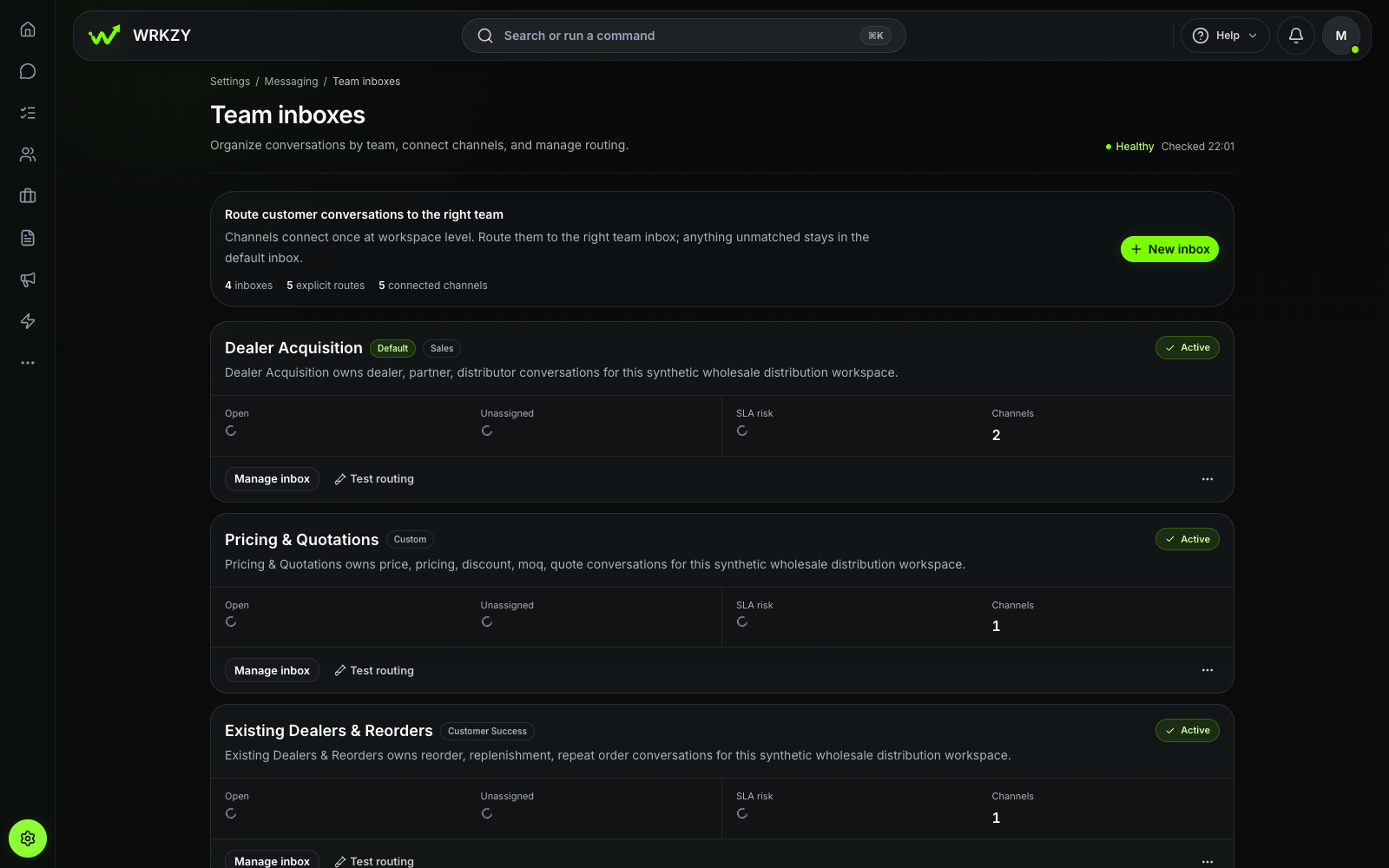 Current productTeam inbox routing and workload healthOpen larger ↗
Evidence boundaryThis capture shows the configured synthetic team inbox at the recorded commit; routing results depend on each workspace setup.
The CRM layer should make that sequence inspectable. A manager ought to be able to see which conversations are unassigned, which customer record they belong to and whether an owner created the work needed after the reply.
That is why a team inbox is necessary but not sufficient. The inbox manages attention. The CRM carries the relationship and the commitments that outlast the message.
Four operating models and the choice each one suggests
1. The owner-operated business
One number, one principal operator, modest volume and few handovers. Start with the Business App and a written daily follow-up habit. Add software only when the work becomes difficult to see.
2. The shared sales desk
Several employees respond to inbound enquiries, but the sales path remains straightforward. A governed team inbox connected through a supported Platform setup may be the immediate need. Add CRM records if qualification, quotations and follow-up span several days or people.
3. The multi-stage commercial team
Sales, technical, finance and operations touch the same opportunity. The business needs the Platform for the channel and a CRM for contact history, deal ownership, quotations, tasks and handovers. Design the process first; then configure routing.
4. The service operation with automation
High message volume makes triage or self-service useful. The Platform supports the messaging flow; the CRM or service system preserves identity, case context and accountability. Every automated path needs a clear route to a person, as required by the business policy and good service practice.
Questions to ask before signing a contract
Do not begin with “Does it have WhatsApp?” Ask what the combination can reliably support.
- Which Meta product and provider arrangement will carry our messages?
- Who owns the business number and the underlying business account?
- How will existing contacts, consent records and conversation history be handled?
- How are new conversations assigned, and what happens if nobody accepts them?
- Can employees see customer, company, deal and quotation context while responding?
- Which message types require templates, and who approves them internally?
- How are delivery failures and unsupported message types surfaced?
- What permissions prevent the wrong person from exporting data or changing channel settings?
- How does automation transfer to a named human owner?
- What remains accessible if we change a software vendor later?
Ask for a demonstration using an anonymised version of a real enquiry. Include a failed delivery, a reassignment and a customer who replies after the original owner is absent. Those moments reveal the operating model more clearly than the happy path.
Choose for the work you actually have
The Business App is not “too basic” when it fits a simple, owner-led process. The Platform is not a CRM merely because it enables software integration. And a WhatsApp CRM is only useful when the team agrees how ownership, follow-up and customer context should work.
Map your current path first: message, qualification, owner, next action, commercial decision and outcome. Then select the smallest combination that makes that path dependable.
For the underlying operating principles, read What is a WhatsApp CRM? and how to coordinate customer conversations across channels.