
Save what happened.
Choose the customer, direction and date. Record the outcome and duration you know, with a summary and notes for your team.
Customer calls
Keep the outcome, notes and next step with the customer. Log calls on web and mobile, so your team can pick up the conversation with the details close at hand.
Outbound · Maya Sharma
Maya Sharma · Tomorrow
01 / The customer’s history
Keep inbound and outbound call records with the customer, so the next conversation starts with context.
Choose the customer, direction and date. Record the outcome and duration you know, with a summary and notes for your team.
Search your calls or workspace history. Filter by customer, caller, date, direction, outcome or source.
Open call history from the customer record. Review notes and update the details when you have more to add.
02 / The next step
A call can end with a promise. Create a linked follow-up task from the call record, so the work has a clear next step.
Explore tasks and follow-ups ↗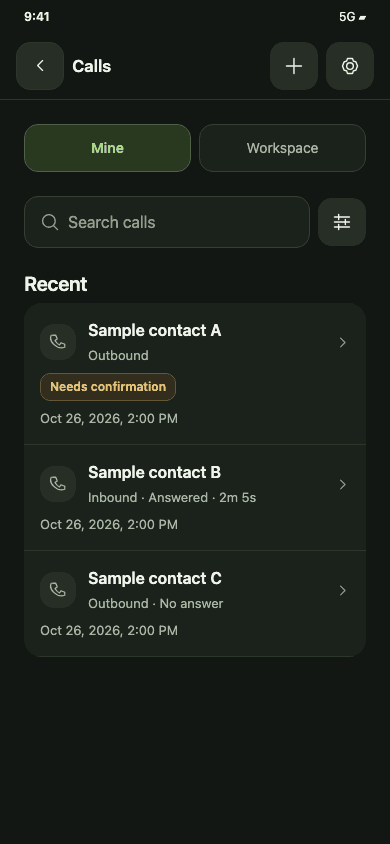
03 / Web and mobile
Log a call at your desk or on your phone. Review the customer’s call history, add notes and create the next follow-up in WRKZY for iOS and Android.
Explore the mobile app ↗Before you get started
Yes. Log past inbound or outbound customer calls on the web or in WRKZY for iOS and Android. Add the date, outcome, summary and notes. Leave duration empty when it is unknown.
WRKZY does not place cellular calls in your browser. Where phone handoff is enabled, you can send a request to your registered phone, then explicitly start the call there. Handoff availability is controlled separately from manual call logging.
No. Customer Calls stores call records, outcomes and notes. It does not record audio or transcribe conversations.
Manual logging is available. Phone observations have separate rollout, device and permission requirements. Review and confirm available details; WRKZY does not treat time away from the app as a connected call duration.
Call access follows your workspace and CRM permissions. Available views include your calls and workspace calls. Editing and follow-up actions depend on the permissions returned for that record.
Try Customer Calls
Keep the outcome, the context and the follow-up together in WRKZY.
Start free trial14-day Growth trial · No card required