
Start with your products.
Add catalog items, bring in products from the deal, or write a custom line.
Quotes
Build a branded quote and share it by email or WhatsApp. Let customers choose their options, accept with a one-time code, or request a change.
Products, installation, and a clear total.
Inside WRKZY
Start with the customer and the deal. Bring in the right products, check the details, and see the offer as you build it.
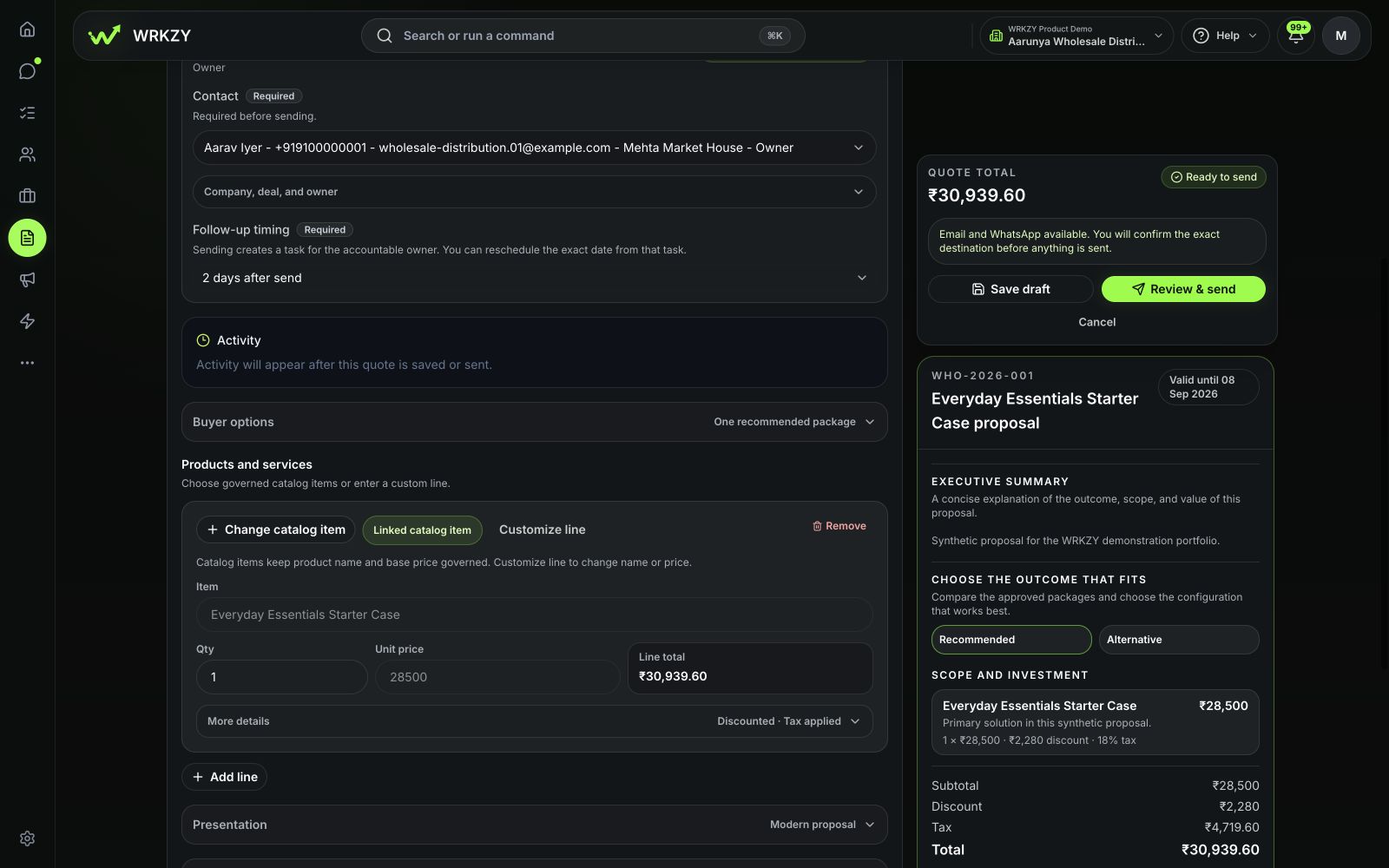
Add catalog items, bring in products from the deal, or write a custom line.
Set quantities, discounts, and tax in the quote currency. Review the total before sending.
Add payment terms and an expiry date so the customer knows when and how to proceed.
Need a standalone PDF? Try the free Quote & Estimate Builder—no signup required.
Quoting similar work? Duplicate an existing offer and adjust the details.
Quote designer
Put your company name, logo, and brand colour on the offer. Create reusable templates with the layout and details that fit your business.
Adjust fonts, colours, spacing, and product images. Show, hide, and reorder sections to suit the offer.
Prepared for your next store opening.
Products and installation · Same offer in both examples.
AI assistance
Bring customer needs and approved catalog prices into a first draft. Check the details, then make it ready to send.
Start with what the customer has asked for.
Example catalog prices · before tax
Confirm quantities, prices, and terms before sending.
Illustrative example. Requires AI setup and reviewed customer information.
Live offer
Share by email or WhatsApp. Let customers choose their options, accept with a one-time code, or tell you what needs to change.
Send by email or WhatsApp. Download a PDF when needed.
Approvals and revisions
Update the offer when the customer’s needs change. Keep previous versions and get approval when required.
When a quote needs approval, send it for review before sharing it with the customer.
See the earlier offer, what changed, and why. Customers can tell which version is current.
Follow-through
See which quotes need a response, a revision, or a handoff. Keep the next action with the person responsible.
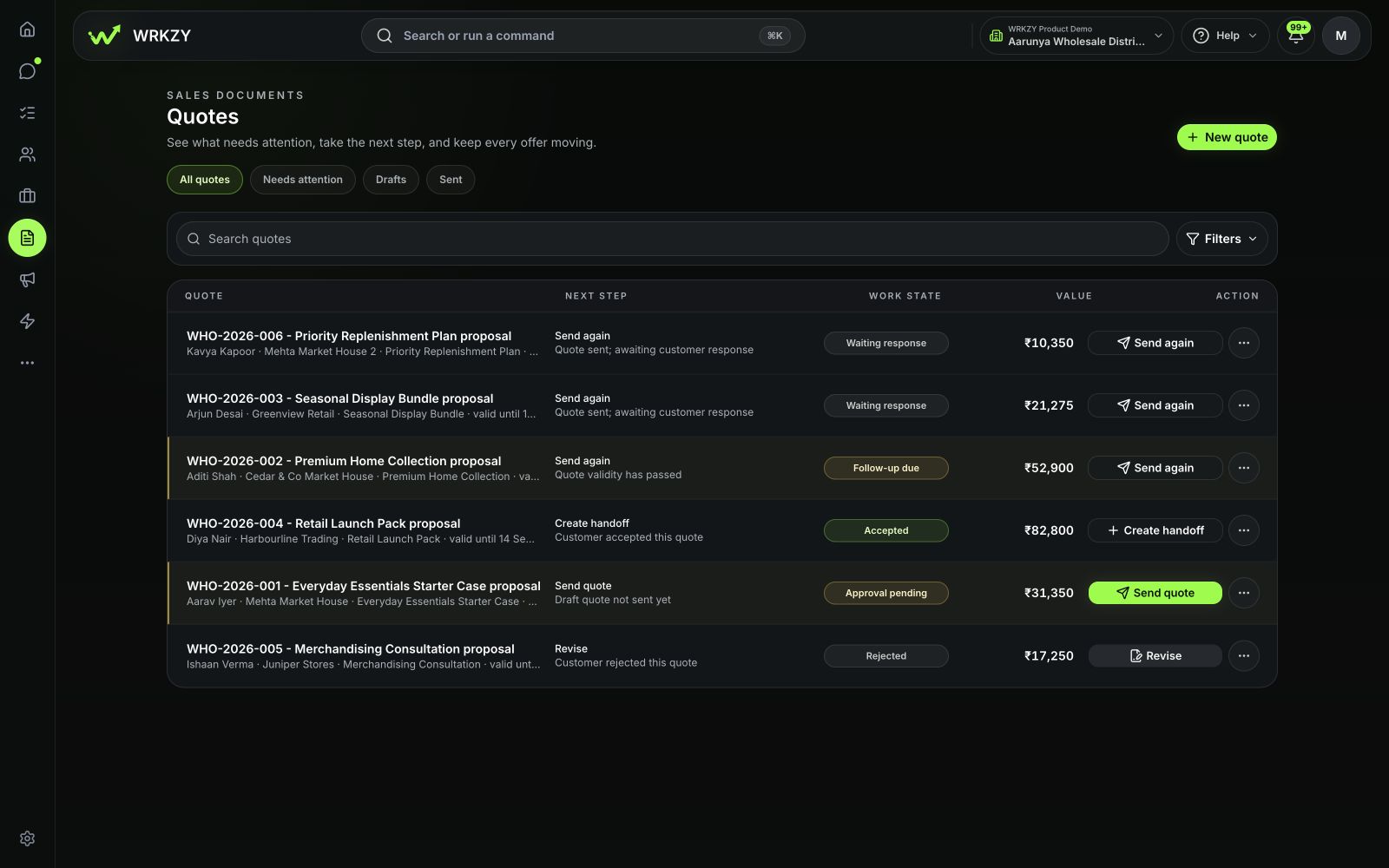
Spot failed sends, expiring offers, and customer requests for changes.
Choose an owner and follow-up time. Sending creates a task your team can reschedule.
Review the agreed amount against the deal value, then confirm the update and next handoff.
Check delivery status and available email opens, link clicks, and quote views before following up.
FAQ
Yes. Create, duplicate, and publish templates, choose a default, and select a published design for each quote. Updating a template does not change quotes already sent.
When AI is enabled, it can identify buying signals from conversations. Create from conversation uses reviewed context and product interests with approved catalog prices to prepare draft lines. Your team reviews the offer before sending.
Yes. Select the channel and the exact customer destination for each send. You can use both channels through separate sends. WhatsApp sending depends on the connected sender and, where required, an approved template.
Yes. Add catalog items or import products and services from the linked deal. You can also add a custom line. Review quantities, prices, discounts, and tax before sending.
Yes. Create packages, mark a recommended option, and include optional items. You can also allow quantity changes within limits you set.
Yes. Add your company name, logo, brand colour, address, email, phone number, and website in quote branding settings. Templates control the layout and sections. Add payment terms, notes, and an expiry date to each offer.
Yes. Configure commercial approval rules and request a review when one is required. The quote shows its approval status before it is shared.
The public quote gives the customer options to accept, decline, ask a question, or request changes. A one-time code sent to the assigned email or WhatsApp destination verifies access for the response. This records a buyer response; it is not an electronic signature.
Create a new revision while retaining the earlier offer and its history. The public experience distinguishes the current offer from superseded, expired, or otherwise inactive versions.
Yes. Download a PDF, or share the quote through the available email, WhatsApp, and link-sharing options. The public quote provides the interactive buyer response experience.
Try Quotes
Build your offer, share it with the customer, and keep the next step in view.
Start free trial14-day Growth trial · No card required