
“Please send the revised quote and confirm Friday delivery.”
Shared WhatsApp and email
Whoever replies seesthe full customer story.
Bring shared WhatsApp and email together with the customer, owner, response time and next step beside every conversation.
For teams that answer customers together.Aarav Mehta · Mehta Stores
- Responsible inbox
- Sales
- Owner
- Maya
- Response due
- Today · 11:30
- Next action
- Confirm the current quote and Friday delivery
- 01Shared WhatsApp and email
- 02One matched customer
- 03One person responsible
- 04A visible next action
The customer should not have to repeat the story
Two channels. One customer waiting.
A message can reach the right company and still leave nobody clearly responsible. Match it to the customer, route it to the right inbox and name the person who will answer.
Revised quote requested
Seen by Sales · no individual owner
Friday delivery follow-up
Seen by Support · customer waiting
Aarav Mehta · Mehta Stores
- What is needed
- Quote and delivery answer
- Who has it
- Maya · Sales
- When it is due
- Today · 11:30
- 01
Connect
Bring the company-owned WhatsApp or shared email source into WRKZY.
- 02
Route
Choose the team inbox expected to watch and triage the work.
- 03
Assign
Name the person responsible for the reply.
01 / Follow one conversation
From new message to a clear next step.
Follow the same request as it arrives, gains context, gets an owner and becomes a reply with a clear next step.
Choose a stage to see what changes.
Bring the message into view.
A message from connected WhatsApp or shared email arrives in the team inbox with its channel and time intact.
The team can see that a customer is waiting.- Channel
- Email · 09:12
- Customer
- Needs matching
- Owner
- Unassigned
- Response due
- Today · 11:30
- Next action
- Match the customer
Arrive
The team can see that a customer is waiting.
Match
Aarav does not have to repeat details the team already has.
Own
Everyone can see who is moving the conversation forward.
Reply
Maya remains responsible for what the customer receives.
Continue
The next teammate with access can pick up the same customer story.
Shared access is not shared ownership
One team view. One clear owner.
The team inbox shows where the conversation belongs. The owner shows who must act. Priority, timing and status keep the next move clear.
- 01Team inbox
Which team is responsible?
Sales
- 02Owner
Who must act next?
Maya
- 03Priority
How urgent is it?
High
- 04Response due
When must the team reply?
Today · 11:30
- 05Follow-up
When will the owner follow up?
Tomorrow · 10:30
- 06State
Is the work open, waiting or complete?
Pending
Pending work keeps its owner until it is reassigned or completed.
Current product, in context
See the conversation and who owns it.
Four product views show what the team needs before anyone replies.
Can the next person see what needs a reply?
The shared thread stays beside its team inbox, owner, timing, customer context and reply controls.
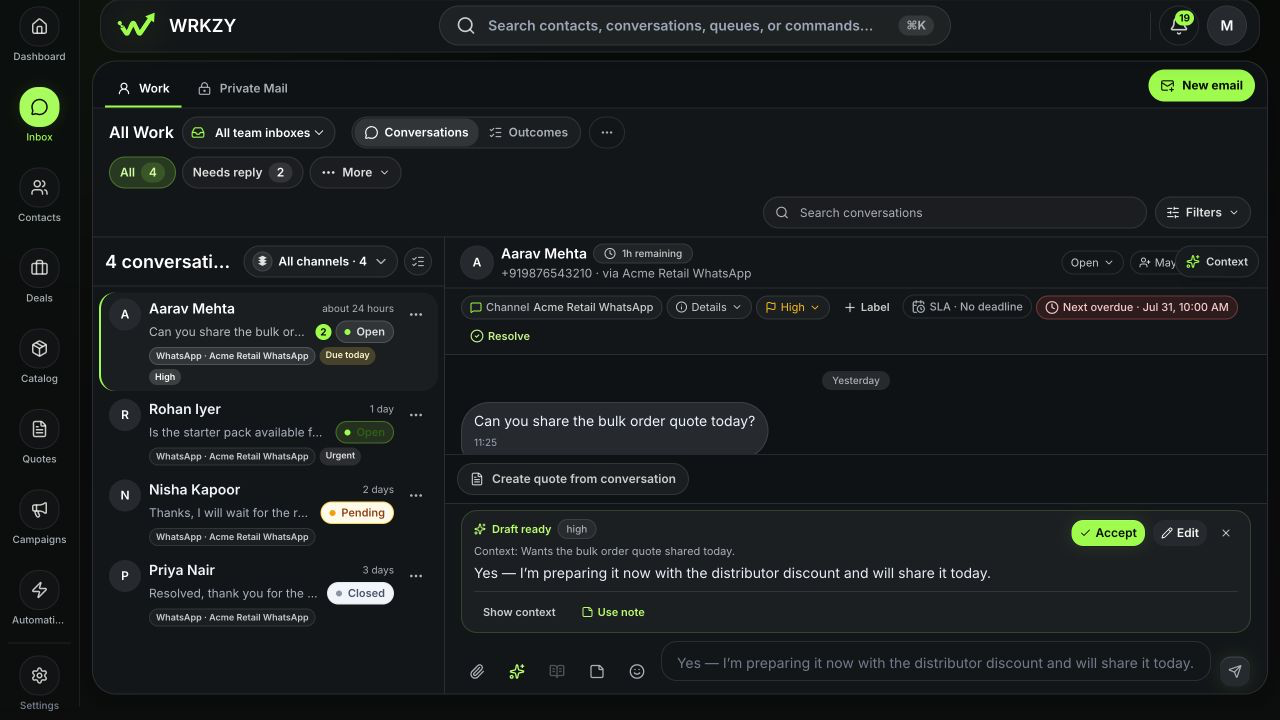
- 01Team inbox and queue
- 02Owner and response timing
- 03Customer context and reply
Will new work reach the right team?
Team Inbox settings show the connected channel, members and conversations waiting for an owner.
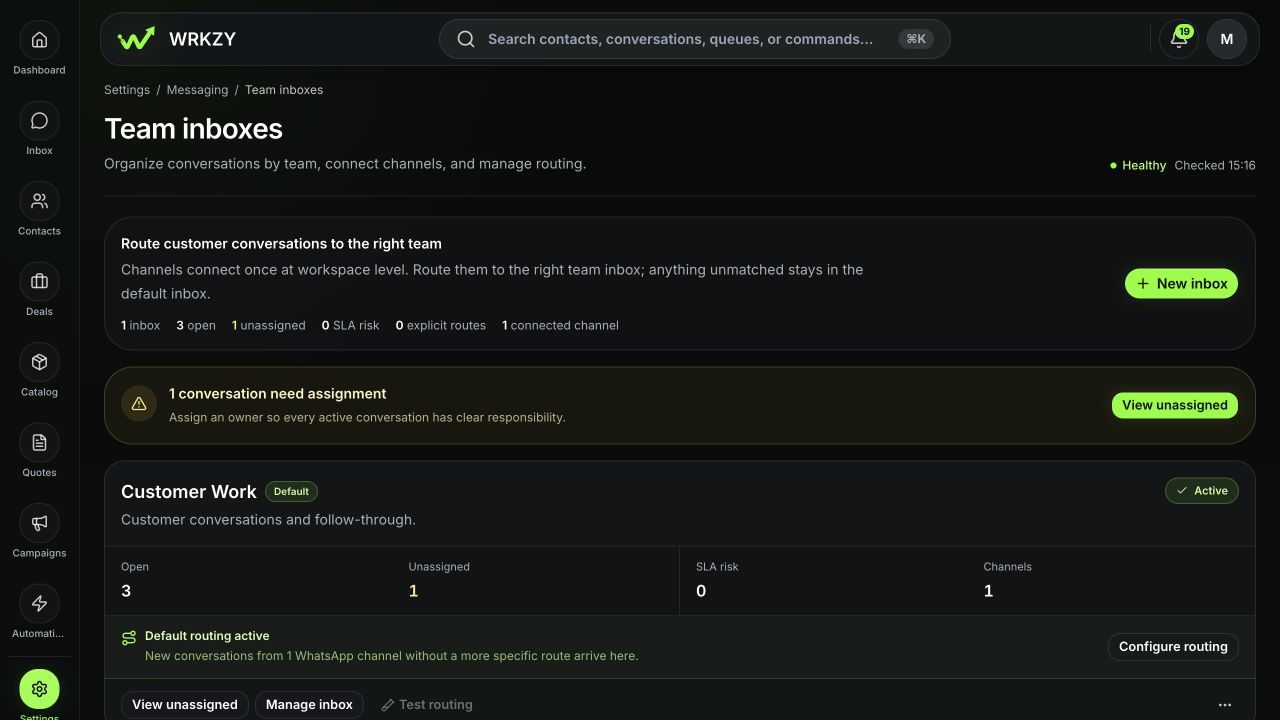
- 01Responsible team inbox
- 02Connected channel route
- 03Visible unassigned work
Does the person replying know the customer?
The contact and company record keeps messages, actions and current commercial work close to the reply.
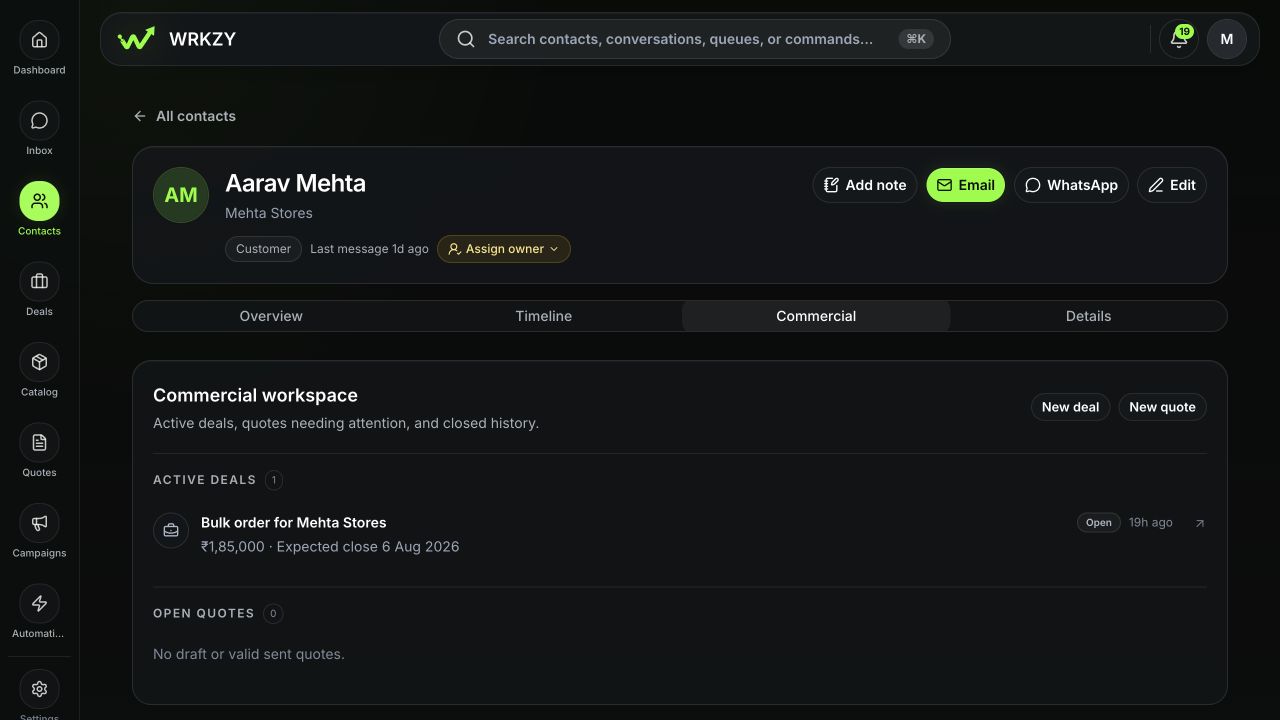
- 01Contact and company
- 02Email and WhatsApp actions
- 03Related commercial work
Can personal email stay private until context is needed?
Private Mail stays visible only to its owner. They choose what context to share with the team.
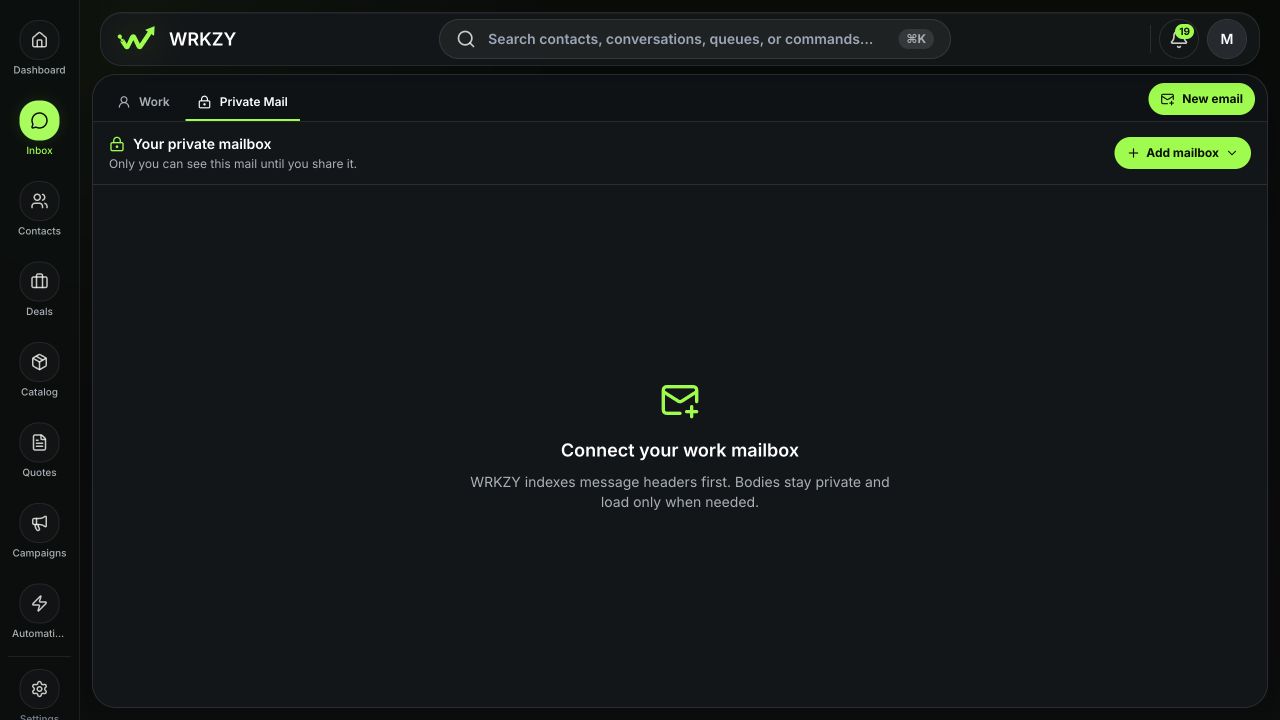
- 01Visible only to its owner
- 02Customer link without message disclosure
- 03Deliberate sharing choices
Reply from the customer story
Reply with the facts in view.
Keep the current message, customer context and related work beside the reply. Assistance can help prepare the words; the teammate sending them owns the answer.
- Current quote
- QT-1048 · Revision 03
- Delivery answer
- Friday confirmed
- Owner
- Maya · Sales
Friday delivery is confirmed. I’m sharing the current revised quote now. I’ll follow up tomorrow morning if you have any questions.
Maya reviews the recipient, quote, dates and commitment before Send.- Summarize
- Draft
- Rewrite
- Translate
- Templates
- Attachments
- Current quote
- Schedule email
AI assistance prepares reviewable text. It does not negotiate, approve or send the customer answer independently.
Private Mail
Private until its owner chooses to share.
Connecting a personal work mailbox to a customer keeps its messages and attachments private. Share only the context the team needs.
- 01
Link the customer record
Associate the thread without sharing message content.
- 02
Share activity only
Show that contact happened, with the owner, channel and date.
- 03
Share an approved summary
Write the exact context the destination team may use.
- 04
Delegate an outcome
Create team-visible work while the source email stays private.
- 05
Share selected evidence
Choose only the required messages and attachments.
- 06
Move future replies to Work
Continue through a verified shared-email identity and assign an owner.
Across today’s conversations
See who needs attention.
Choose the queue that answers the question, then act from the conversation.
- 01Needs reply
Which customer is waiting for an answer?
Find conversations whose current state needs a response.
- 02Unassigned
Which conversation has no owner?
Claim new work before it becomes somebody else’s assumption.
- 03SLA Risk
Which response commitment is close or overdue?
See timing risk while there is still a decision to make.
- 04My Work
What am I responsible for now?
Work from the conversations currently assigned to you.
- 05Follow-ups
Which next actions are due?
Return to conversations at the time the owner recorded.
- Team inbox
- Channel
- Owner
- Status
- Priority
- Date
- Unread
- Search
- Saved views
When the reply is sent
Keep what happened—and what happens next.
Record the message evidence, conversation state, owner and next action together so the customer story remains usable.
Revised quote shared · Friday delivery confirmed
Aarav Mehta · Mehta Stores
- Sent by
- Maya · Sales
- Channel
- Provider state
- Delivered · 11:04
- Conversation state
- Pending
- Next action
- Follow up tomorrow · 10:30
Delivered does not mean accepted. Pending does not remove ownership.
One shared source
Start with one shared conversation.
Connect a company-owned WhatsApp or shared email account. Choose the team inbox and owner, then test one real conversation.
Connect your first shared source.
Start free trial14-day Growth trial · No card required
Several inboxes, workspaces or routing rules?
Talk through migrations, team boundaries and the way customer conversations should reach the right people.
Talk to salesCommon questions
Can WhatsApp and email live in the same Inbox?
Yes. Connect supported company-owned WhatsApp and shared-email accounts to Work, then filter by team inbox or channel when you need a narrower view.
Does WRKZY combine a person’s channels by itself?
Separate threads are not treated as the same customer automatically. Verify the contact and company before using earlier relationship context or combining customer work.
What is the difference between routing and assignment?
Routing sends shared work to the responsible team inbox. Assignment names the individual accountable for the next decision.
Can teammates read my Private Mail?
Unshared Private Mail remains visible only to its mailbox owner. Linking a customer record does not expose the subject, messages, participants or attachments.
Does AI send replies for the team?
AI can help summarize, draft, rewrite or translate. A teammate reviews the customer, facts, recipients and commitment before sending.
Is Delivered the same as resolved?
No. Delivered is provider evidence about the message. Pending, Open and Closed describe the team’s work, and the recorded outcome explains how it ended.