
See where things stand.
Check active deals, existing quotes, and the customer’s activity history before deciding what to say next.
Inbox
Bring WhatsApp and email together, with the right team, owner, and next step attached to each conversation.
“Can you send the revised quote before 3?”
Inside WRKZY
Assign an owner, prepare a reply, and set a follow-up. Choose a step to see it in WRKZY.
Create a free WhatsApp link and QR kit — branded downloads, with no signup.
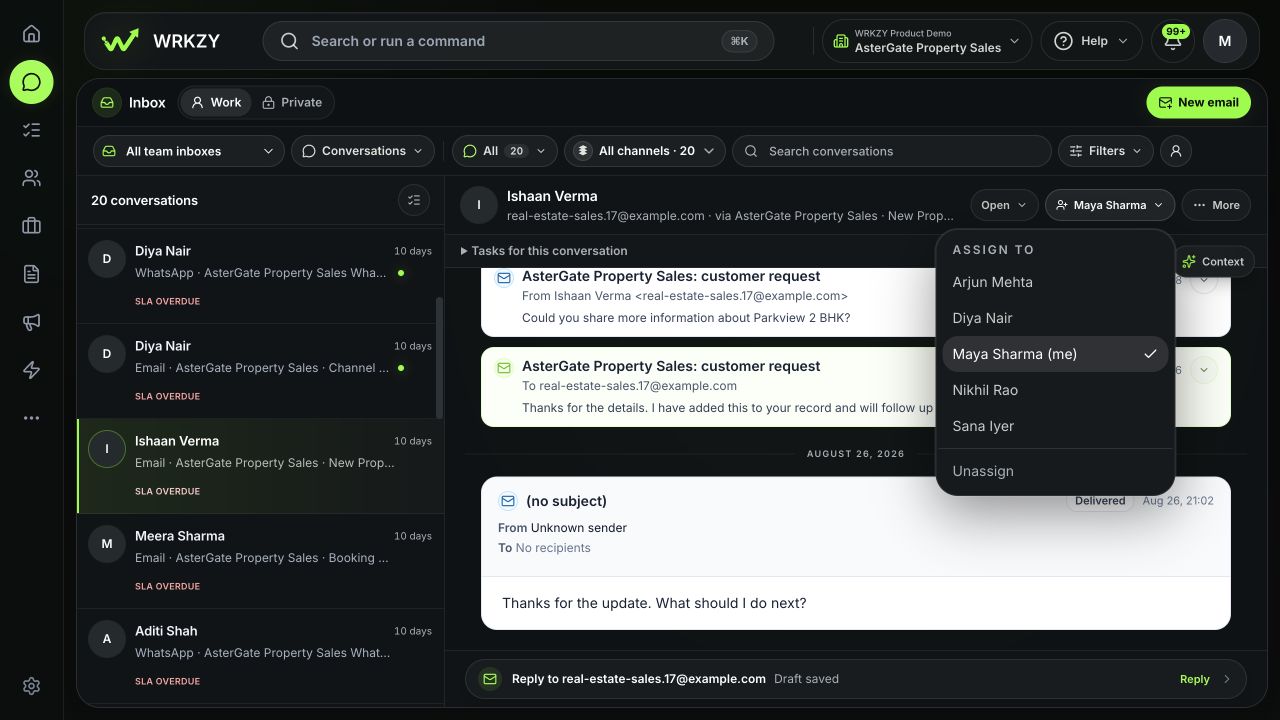
Current product · One demo conversation · Captured September 5, 2026
Team inboxes
Give each team its own inbox, members, and routing rules. Explore how that works across 13 industries.
Choose an inbox
property · apartment · villa · price
Want the complete workflow? See the Real estate story →
Configurations from our 13 industry demos. Choose your own inbox names, members, and routing rules.
Check owners and due follow-ups in Team workload, and response deadlines in SLA Risk.
Customer follow-through
Assign the next step, track what’s holding it up, and keep your team informed until the work is done.
Keep the customer’s message linked to the work that follows.
Assign a teammate, set a deadline, and track anything holding up delivery.
Add a completion note or supporting evidence so the customer-facing team knows what happened.
Illustrative example.
AI assistance
Get the gist of a conversation, draft a reply, or sharpen what you’ve written. You decide what gets sent.
“We’re looking at 40 units. Can you confirm delivery to Pune?”
“And please include installation in the quote.”
Customer wants a quote for 40 units including installation, and confirmation of delivery to Pune.
“Thanks for the details. I’ll check delivery to Pune and prepare a quote for 40 units with installation included.”
Writing in another language? Translate your draft, review the wording, and send when it’s ready.
Customer context
See their deals, quotes, product interests, and previous activity alongside the conversation. Pick up the thread with the details close by.
Check active deals, existing quotes, and the customer’s activity history before deciding what to say next.
Select a relevant quote to share with the customer. Keep the offer connected to the conversation that led to it.
Private Mail
Connect your Google Workspace or Microsoft 365 mailbox. Keep emails linked to customer records, and share selected context when a teammate needs it.
Link an email to the right customer record. Its subject, messages, and attachments stay private to you.
Explore Private MailShare a summary or selected messages. You approve what’s shared; the rest stays private.
See what sharing includesFAQ
Yes. Connect a supported WhatsApp Business account and team email account to work from the same Inbox. You can filter by channel when you want to focus on one.
For team email, configure incoming mail and connect Google Workspace, Microsoft 365, or SMTP to send from your shared address. Private Mail supports individual Google Workspace and Microsoft 365 work mailboxes.
Yes. Create team inboxes for different types of work, then configure their members, routing, and assignment rules. You can also start with a single shared inbox.
Unshared Private Mail is visible only to its mailbox owner. A CRM link does not expose the email’s subject, messages, or attachments. You choose what to share and approve it first.
The Inbox drafting tool prepares a reply for you to review. You can edit it before sending. Check names, prices, dates, and any commitments before it goes to the customer.
Yes. Prepare your email and choose a send time. Scheduled sending is available for email conversations. Reusable email templates and signatures help with the replies your team writes often.
WhatsApp has a 24-hour customer service window. Outside that window, use an approved template to re-engage the customer. The Inbox shows when the session has expired.
Try Inbox
Bring your team’s WhatsApp and email conversations into WRKZY. Start with one shared inbox.
Start free trial14-day Growth trial · No card requiredWhatsApp and email-provider usage fees are separate.