
Wholesale reorder · WhatsApp
Delivered · 10:06
From campaign to customer work
Plan the audience, review the send, and turn every meaningful reply into owned customer work.
For teams running WhatsApp and email campaigns.Delivered · 10:06
“Can you quote for 40 units?”Aarav Mehta · Mehta Stores
Delivery is not follow-through
Provider evidence stops at delivery. It does not show whether a reply was understood, assigned, or moved forward.
“Can you quote for 40 units?”
BeforeNo individual owner
AfterMaya · Prepare quote by 16:00
Use sent, delivered, failed, read, or opened states where the channel supports them.
Keep the reply with the campaign and the customer relationship it belongs to.
Name the owner, next action, and due time while the response still matters.
01 / Follow one campaign
Follow one campaign from audience review to delivery, response, and the next action.
Choose a stage.
Define the outcome and channel, then review eligibility, consent, exclusions, duplicates, and contact pressure.
A useful audience matters more than a large one.Current product, in context
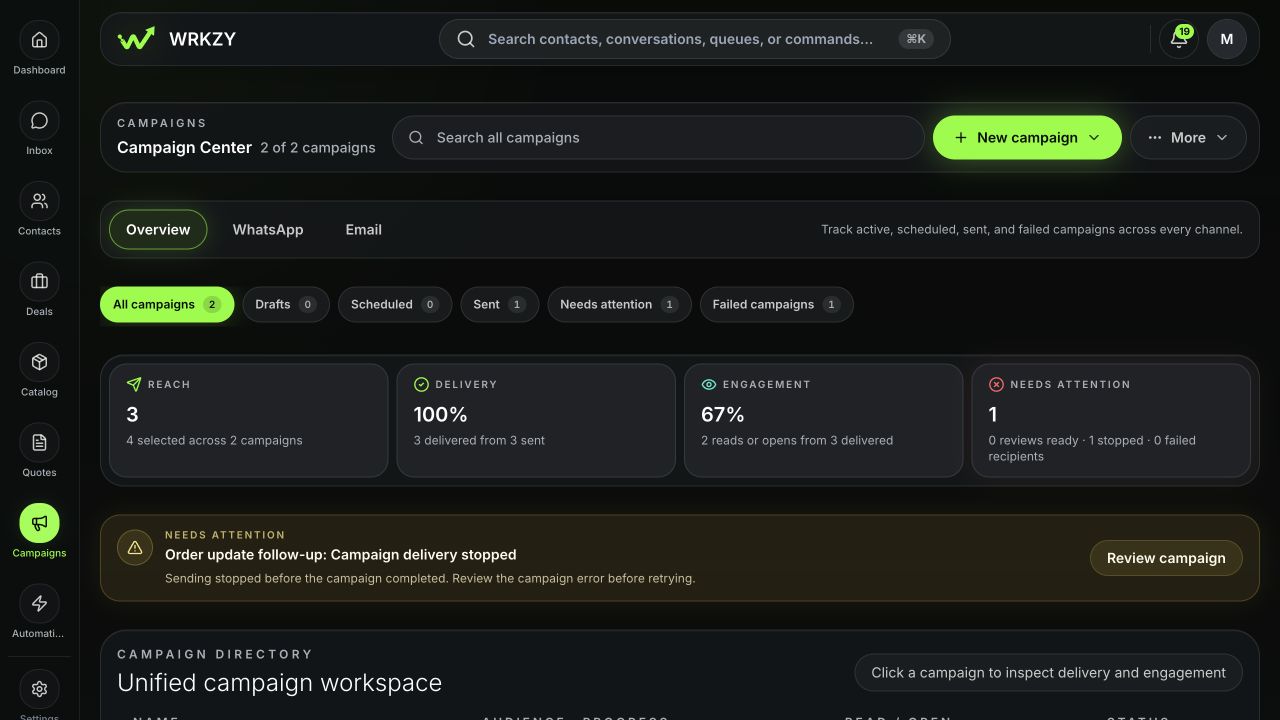
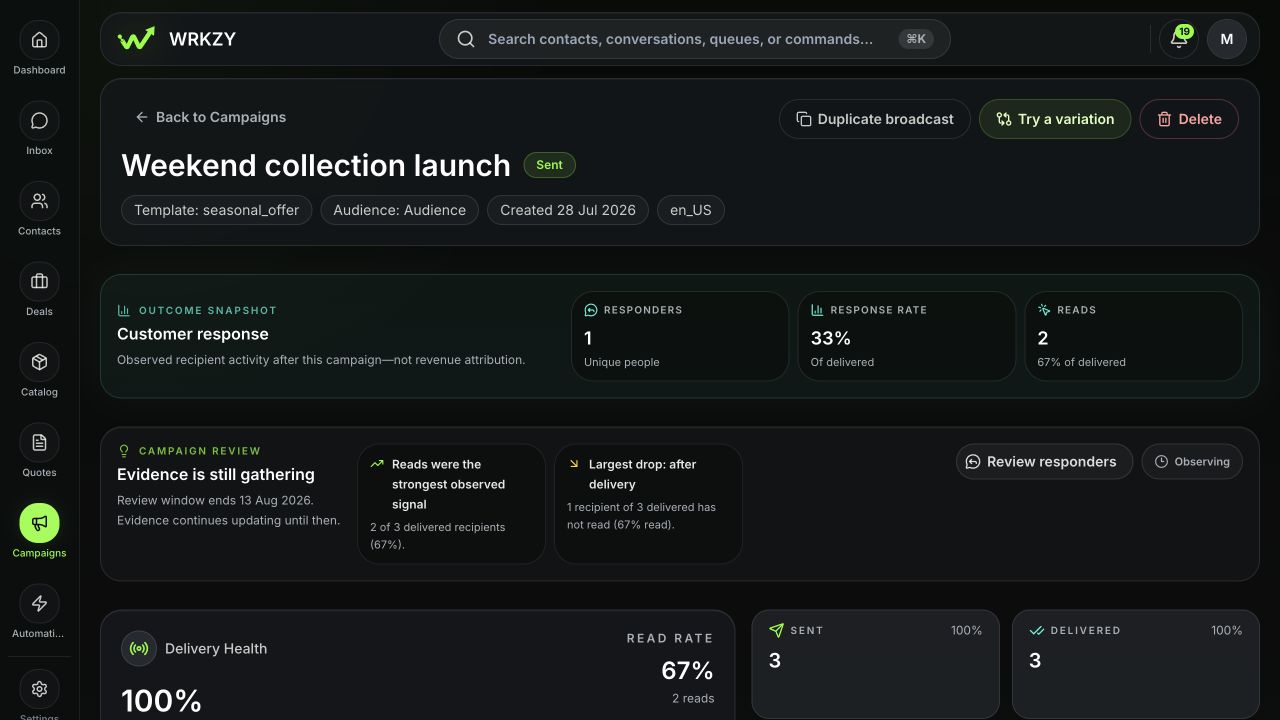
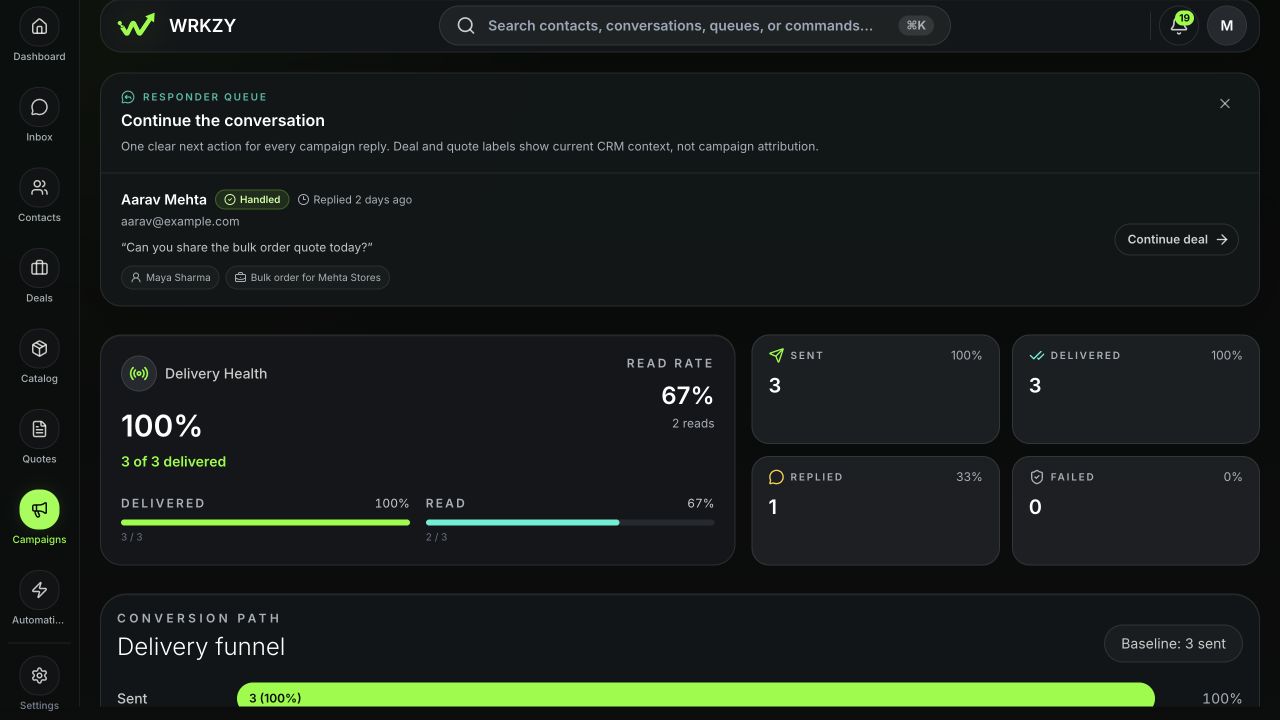
Three product views connect the campaign, its result, and the customer response that needs action.
Campaign Center shows channel, delivery health, campaign state, and exceptions in one view.
The outcome view keeps responders, the review window, and current evidence together.
Open a reply with its customer, owner, and related work before continuing.
What the campaign evidence says
A delivery signal, a reply, and a customer outcome are different things. Keep them separate so the next action is clear.
Campaign path
Included in the audience snapshot before final checks.
Handed to the supported provider path.
Reported as delivered where the provider supports that state.
Read, opened, or clicked where the channel supports it.
A recipient response that may require customer work.
Customer work beginsExceptions and instructions
Removed for a recorded eligibility, consent, suppression, data, duplicate, or frequency reason.
An exception to inspect before any supported retry.
A customer instruction that governs future eligibility on that channel.
Delivered is provider evidence, not customer action. WhatsApp reads and email opens are measured differently.
02 / Own the response
Keep the reply with its customer context, then assign the next action and due time.
When the normal path stops
Find the reason before changing the audience, sender, message, or channel.
Consent, unsubscribe, suppression, missing data, duplicates, or contact pressure can keep a recipient out.
Keep the recorded reasonGroup failures by cause and inspect the provider, sender, template, address, or recipient evidence.
Resolve the cause firstRetry only the failed recipients who remain eligible.
Avoid duplicate sendsConsent does not transfer between channels. Never remove an unsubscribe or protected suppression simply to increase reach.
After the review window
Check the replies, open follow-ups, and delivery exceptions. Then change one thing for the next campaign.
What were we trying to achieve?
Did every useful reply get an owner?
What is still unresolved?
What should change next time?
Campaign comparisons are directional, not controlled A/B testing. Observed customer activity is not revenue attribution.
Assistance around the campaign
Summarize the brief, improve the wording, and prepare follow-up for review.
AI can prepare the work. A person approves every launch, exception, CRM change, and customer-facing reply.
Start with one real campaign
Choose one campaign. Set the outcome, review the audience, and name who owns replies and failures. Then review what happened.
14-day Growth trial · No card required
Talk through migrations, sending identities, consent controls, and ownership across teams.
Talk to salesCommon questions
No. They are channel-specific signals governed by different provider and measurement rules. Review them in their own channel context.
An excluded recipient did not enter the send because an eligibility or audience rule applied. A failed recipient entered the send but did not complete successfully.
No. Delivered is provider evidence about message transport. A reply, decision, or accountable next action is separate customer work.
Open the reply with its customer context, assign the responsible teammate, and record the next action and due time in the workflow that will move it forward.
Campaigns can be linked as purposeful variations and compared directionally when their cohorts and measurements are sufficiently similar. That is not controlled A/B testing.
Provider messaging fees are separate. Applicable WhatsApp or email delivery costs depend on the connected provider and its commercial terms.