

The first month of a CRM rollout is often consumed by fields, imports and permissions. On day 30, the system looks organised but the sales team still follows up from memory and the manager still asks for a spreadsheet.
That is a configuration project, not an operational rollout.
A useful first 30 days should put one real customer workflow into daily use. The team needs to know which work belongs in the CRM, who owns it, what evidence moves it forward and how managers will use the same records. Everything else can follow.
This checklist is designed for a 5–50-person business implementing a CRM without a large transformation office. Adjust the dates to your calendar, but preserve the order: decisions before data, data before automation and live practice before expansion.
The day-30 definition of done
By the end of the month, aim for these outcomes:
- one priority customer journey runs in the CRM;
- active contacts and companies are clean enough to use;
- relevant channels are connected through supported paths;
- every qualified item has a named owner;
- pipeline stages have evidence-based entry criteria;
- active deals have a dated next action;
- one quotation or equivalent commercial workflow has been tested where relevant;
- role and access boundaries are understood;
- managers review exceptions inside the system; and
- employees know where to get help and how to report a process gap.
Do not define success as “all data migrated” or “all users trained.” Those are inputs. The outcome is a team operating a customer workflow with less ambiguity.
- Days 1–5ScopeOne workflow and accountable roles
- Days 6–10DataClean, tested, reconciled records
- Days 11–15ChannelsRouting, assignment, and handover
- Days 16–20WorkflowPipeline, context, and quotation path
- Days 21–25ControlsPermissions, reminders, and failure paths
- Days 26–30AdoptionLive practice and manager review
Days 1–5: choose the operating scope
Start with one journey that matters and repeats. A common choice is enquiry → qualification → quotation → decision. A service business may choose request → assignment → resolution → follow-up.
Day 1 — appoint accountable roles
Name four people, even if one person holds several roles:
- business owner: decides what the workflow must achieve;
- workspace administrator: manages configuration and access;
- process owner: defines stages, responsibilities and exceptions; and
- team champion: tests the workflow and helps colleagues use it.
The software vendor may advise. It should not decide your commercial rules.
Day 2 — map the current journey
Use one recent example. Mark where customer information enters, where it is copied, where somebody waits and where management loses visibility. Include WhatsApp, email, spreadsheets and informal handovers.
Day 3 — write the future-state rule
Keep it plain: “Every qualified enquiry has one owner, a next action and a visible outcome.” Add the evidence required for qualification and closure.
Day 4 — define what is out of scope
Delay secondary pipelines, advanced dashboards, broad automation and historical archives unless the first workflow depends on them.
Day 5 — agree the baseline
Take a snapshot of current conditions: unassigned enquiries, active deals without next actions, overdue follow-ups and time spent preparing manual reports. These are operating observations, not promises of improvement.
Days 6–10: prepare data the team can trust
A hurried import can make the new CRM less credible than the old spreadsheet.
Day 6 — inventory sources
List spreadsheets, address books, old CRM exports, shared inboxes and quotation logs. Name an owner for each source.
Day 7 — define the minimum record
For contacts, this may include name, primary communication detail, company and owner. For companies, include business name, relevant location or segment and accountable owner. Import only fields with a clear purpose.
Day 8 — clean a working set
Begin with active customers and live opportunities. Standardise obvious variations, remove test rows and identify duplicates. Preserve source identifiers so uncertain matches can be reviewed.
Day 9 — test the import
Import a small sample. Check Indian phone-number formats, required fields, owners, company relationships, dates and special characters. Export the same sample and confirm it remains understandable.
Day 10 — migrate and reconcile
Import the agreed working set. Compare record counts by category and inspect a sample manually. Do not delete the source material merely because an import completed; follow your approved retention process.
Days 11–15: connect channels and ownership
The CRM becomes real when live customer work reaches it.
Day 11 — connect one priority channel
Use the supported connection process. Confirm number or mailbox ownership, required business accounts, consent practices and provider rules. For WhatsApp, review the current WhatsApp Business Messaging Policy.
Day 12 — define matching and creation rules
Decide how a new message finds an existing customer, when a new contact may be created and who resolves uncertain duplicates.
Day 13 — configure assignment
Set the default queue or owner, working coverage and escalation for unattended items. “Anyone can pick it up” is not a control.
Day 14 — test channel exceptions
Send test messages through supported paths. Include an unknown contact, a failed delivery, an after-hours reply and an absent owner.
Day 15 — practise a handover
Have one employee transfer a live or test conversation to a colleague. The receiver should understand the customer, current request, prior decision and next commitment without a separate briefing.
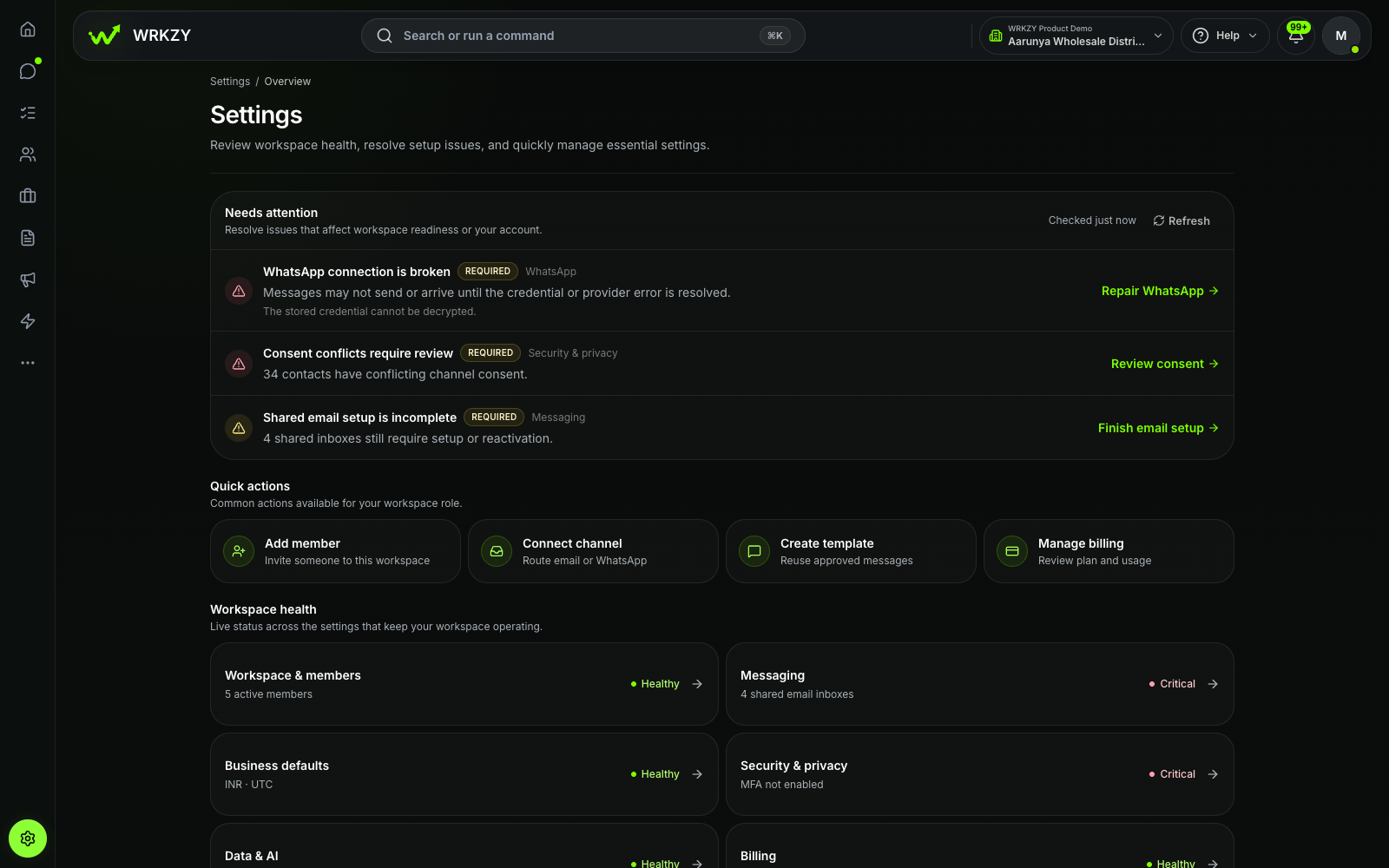 Current productWorkspace health and setup actionsOpen larger ↗
Evidence boundaryThis capture shows available settings and health notices only; it does not establish that every integration is configured.
Days 16–20: configure the commercial workflow
This is where records become a sales or customer-operations system.
Day 16 — create the minimum pipeline
Use only stages the team can define with evidence. Design pipeline stages around what has actually happened, not confidence percentages.
Day 17 — define ownership and next actions
Every active deal needs one accountable owner. Decide what makes a next action executable and how overdue work will be reviewed.
Day 18 — connect customer context
Confirm that contact, company, conversation and opportunity can be understood together. Remove unnecessary fields that distract from the working record.
Day 19 — test the quotation path
If the business quotes, build one standard offer and one revision. Check current products or services, buyer context, approval, version history, delivery and follow-through. Do not assume the CRM replaces accounting, invoicing, tax or legal review unless that scope is explicitly supported.
Day 20 — run a complete scenario
Take an illustrative enquiry from first message to a recorded decision. Include reassignment and a change request. Record every gap; do not repair the demonstration with private messages.
Days 21–25: add narrow controls and automation
Only automate a path the team has operated manually and understands.
Day 21 — choose two exceptions worth surfacing
Good first candidates are a qualified enquiry with no owner and an active deal with no future action.
Day 22 — configure internal reminders
Use reminders to surface genuine commitments. Avoid creating a flood that employees learn to ignore.
Day 23 — define human escalation
For any automated triage or customer message, specify the conditions that transfer work to a person and what context travels with it.
Day 24 — set permissions and review access
Check administrator rights, exports, channel settings, sensitive data and the access of employees whose role has changed. Use the least access that still lets people do their jobs.
Day 25 — test failure paths
Disable a test user, create a duplicate, leave work unassigned and trigger an overdue item. The team should know how each condition becomes visible and who resolves it.
Days 26–30: launch the habit
Training should follow the customer journey, not the application menu.
Day 26 — train with three real scenarios
Each employee should capture an enquiry, assign or accept ownership, create a next action, update an outcome and perform a handover. Use the terms the team already uses with customers.
Day 27 — run the first daily review
Managers open unassigned, overdue and no-next-action views inside the CRM. Do not request a parallel sheet.
Day 28 — hold office hours
Collect friction in two categories: “I do not know how” and “the process does not fit the work.” The first needs guidance; the second needs an operating decision.
Day 29 — correct the smallest useful set
Fix blocked fields, confusing stages, ownership gaps and excessive alerts. Avoid adding major new scope before the core workflow settles.
Day 30 — conduct the launch review
Compare the baseline with the current operating view:
- Are qualified enquiries assigned?
- Do active deals have dated next actions?
- Can a manager find overdue work without a new report?
- Can a colleague continue an account using the recorded context?
- Are users doing material work outside the agreed system?
Record the answer and choose the next 30-day improvement. Do not declare victory because the configuration is complete.
The rollout calendar at a glance
| Period | Focus | Tangible output |
|---|---|---|
| Days 1–5 | Scope and accountability | One journey, named owners, baseline and boundaries |
| Days 6–10 | Data | Reconciled active records and a documented import |
| Days 11–15 | Channels and ownership | Supported connection, matching rules and tested handover |
| Days 16–20 | Workflow | Evidence-based pipeline, next-action rule and end-to-end test |
| Days 21–25 | Controls | Narrow reminders, permissions and failure-path tests |
| Days 26–30 | Adoption | Scenario training, daily review and measured launch decision |
What to postpone
Small teams gain speed by being deliberate about what they will not build in month one.
Postpone complex lead scoring, broad campaign automation, executive dashboards with untrusted data, extensive custom fields and historical imports that nobody will use. Add them when a real decision depends on them.
The strongest early signal is mundane: employees open the CRM to do the work, and managers use those records to remove obstacles. That is how the system becomes the normal place for customer operations rather than another reporting obligation.
If you are still comparing systems, use the 12-question CRM buying scorecard first.
Explore the WRKZY workspace for connected customer operations.