

The wrong way to choose a CRM is to collect a long list of features, sit through six polished demonstrations and pick the product with the most ticks.
The right starting point is less glamorous: take three customer journeys your team handles every week and find where responsibility becomes unclear. Perhaps a website enquiry is copied into a sheet. A quotation is sent over WhatsApp. A site visit is written in somebody’s diary. The buyer replies while the salesperson is travelling, and the manager discovers the delay two days later.
CRM software should make that work easier to own and continue. For a small business, the best CRM is not the one with the largest feature catalogue. It is the one the team can operate consistently, with enough control to protect customer relationships as the business grows.
Define the job before comparing products
Write one sentence that describes what must improve. Avoid vague goals such as “centralise everything” or “get better visibility.” A useful brief sounds like this:
Every qualified dealer enquiry must have one owner, a dated next action, its current quotation and a recorded outcome that the manager can inspect without asking for a separate report.
That sentence gives a vendor something concrete to demonstrate. It also protects the business from buying impressive capabilities that do not address the current failure.
Choose two or three representative workflows:
- an inbound enquiry that may become a sale;
- an existing customer asking for service or a revision; and
- a commercial handover involving sales, finance or operations.
Use these throughout the evaluation. If the CRM cannot carry your ordinary work cleanly, advanced dashboards will not rescue it.
The 12-question CRM scorecard
Score every question from 0 to 3:
- 0 — absent: the product cannot support the requirement;
- 1 — workaround: possible through manual steps or another tool;
- 2 — usable: the standard workflow meets the need with modest configuration;
- 3 — strong fit: the workflow is clear, controlled and easy for the team to repeat.
Weight the questions that matter most to your business before vendor demonstrations. Do not adjust the weight because a salesperson shows an attractive feature.
| # | Evaluation question | What to inspect in the demonstration |
|---|---|---|
| 1 | Can the CRM represent our real customer relationships? | Contacts, companies, multiple people per account, roles and duplicate handling |
| 2 | Can conversations connect to customer context? | Supported channels, matching rules, history and access boundaries |
| 3 | Can every open item have one accountable owner? | Assignment, reassignment, queues, absence and escalation |
| 4 | Can the owner record a specific next action and date? | Tasks, reminders, overdue states and closure evidence |
| 5 | Does the sales pipeline reflect evidence rather than optimism? | Stage criteria, required fields, history and lost reasons |
| 6 | Can the team prepare and track quotations responsibly? | Buyer context, versions, approvals, delivery and responses |
| 7 | Can a colleague continue the work without private knowledge? | Timeline, notes, recent decisions, linked records and handovers |
| 8 | Are permissions appropriate for a small but growing team? | Role controls, exports, settings, sensitive fields and audit history |
| 9 | Will employees use it during normal work? | Steps per workflow, mobile/browser fit, search and unnecessary data entry |
| 10 | Can managers inspect exceptions without shadow reporting? | Unassigned, overdue, stalled and failed work views |
| 11 | Can we move our data in and out responsibly? | Import validation, export coverage, attachments, IDs and exit process |
| 12 | What is the three-year operating cost? | Licences, messaging, implementation, support, integrations and internal admin time |
A simple total is useful, but it should not override a critical zero. If the business depends on WhatsApp-led enquiries and the proposed system cannot preserve channel context or ownership, a high score elsewhere is irrelevant.
What an Indian small business should verify
“India-ready” should describe the way the product fits your operation, not the flags displayed on a vendor page. Ask the shortlisted provider to demonstrate the details that affect your team:
- Commercial cost: Can it quote in INR, show applicable taxes on the vendor invoice and explain messaging, storage, implementation and support charges separately?
- WhatsApp ownership: Does the setup use a company-controlled number and business account? Who retains administrative access if an employee or implementation partner leaves?
- Accounting handoff: Can accepted commercial information move into Tally or the accounting system your finance team actually uses without retyping prices, taxes and customer identities? Confirm whether this is a native integration, an export or a paid implementation.
- Working conditions: Does the mobile and browser experience suit employees who travel between dealers, customer sites and offices? Are support hours and escalation routes useful in your operating timezone?
- Data control: Can an administrator export contacts, companies, conversations, activities and commercial records in an understandable form? Ask where data is processed, which subprocessors are involved and how deletion or retention requests are handled.
- Implementation responsibility: Which work belongs to the vendor, an implementation partner and your own administrator? Put data preparation, configuration, training and post-launch support into the commercial proposal.
Customer records may contain digital personal data. Review the vendor’s contractual and operational controls against the Digital Personal Data Protection Act, 2023 and the current Digital Personal Data Protection Rules published by MeitY. The software demonstration is not a legal assessment; involve the appropriate adviser for obligations specific to your business.
Look for connected customer context
Small teams often begin with contact storage and discover later that a name and phone number are not enough. The useful record connects the person to their company, conversations, open deals, quotations, recent activity and next commitment.
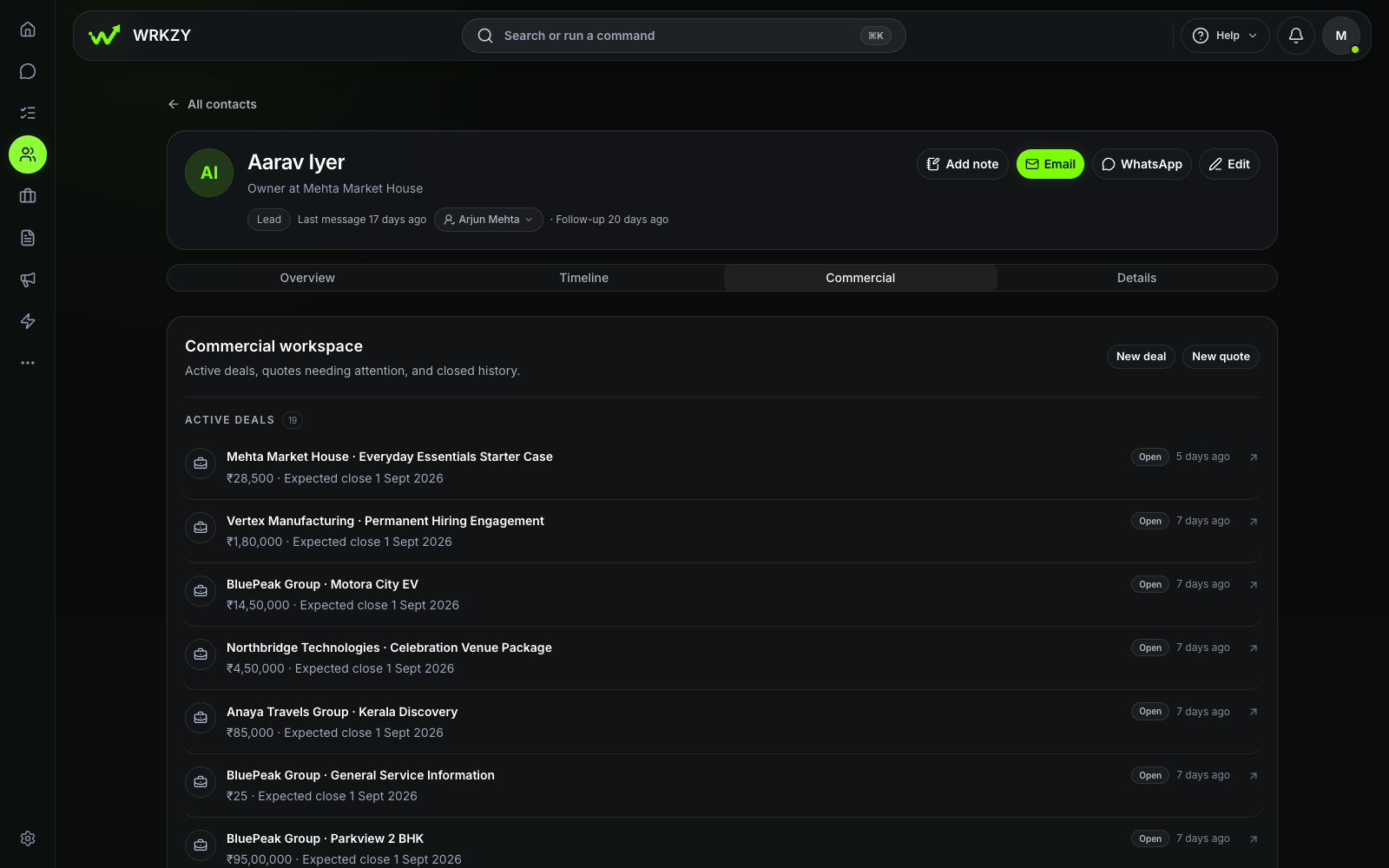 Current productCommercial context linked to one contactOpen larger ↗
Evidence boundaryThis capture shows one synthetic contact record and linked commercial context; it does not prove automatic data completeness.
Ask the vendor to open a contact and answer practical questions: What is this person waiting for? Which offer is current? Who owns the account? What changed in the last conversation? What is due next?
If the answers require five unrelated searches, the CRM may store the data without creating usable context. Building useful customer context explains how to distinguish a working customer record from a digital address book.
Test the awkward moments
Most demonstrations are built around a clean new lead. Your team spends much of its time on untidy cases.
Ask to see what happens when:
- a contact already exists under a different spelling;
- the customer writes from another channel;
- the owner is on leave;
- a deal changes value or expected date;
- a quotation is revised after internal review;
- a task becomes overdue;
- a user loses access; or
- a customer asks for their data to be corrected or removed.
The quality of exception handling tells you more about daily usability than the speed of creating the first record.
Judge adoption as an operating design problem
Teams rarely reject CRM because they dislike customer discipline. They reject work that feels duplicated, poorly timed or disconnected from the conversation they are already having.
For each workflow, count what the employee must do after a customer interaction. If a salesperson replies in one tool, copies notes to another, updates a sheet and messages a manager, the CRM is competing with work instead of supporting it.
Good adoption design has a few recognisable qualities:
- the employee can update the record where the decision happens;
- required fields are limited to information somebody will use;
- stage changes have clear evidence;
- the next action is quick to create and visible later; and
- managers use the same system rather than requesting parallel reports.
Do not confuse more mandatory fields with better control. Every field should have an owner, a decision it supports and a point at which it becomes knowable.
Price the operation, not only the licence
The monthly subscription is one part of the cost. Build a three-year view that includes:
- setup and data preparation;
- user licences and expected growth;
- channel or message charges where applicable;
- paid integrations and storage;
- implementation or partner fees;
- training and internal administration;
- time spent on manual workarounds; and
- exit, export or migration costs.
A lower-priced CRM becomes expensive if the team maintains separate spreadsheets to fill its gaps. A more capable system becomes wasteful if only a fraction of its complexity is relevant.
Ask every vendor to state what is included, what is metered and what normally requires paid assistance. Put those answers in the same comparison document.
Run a proof with real work
A two- or three-week proof is more useful than another presentation. Use a small team, a limited data set and two live workflows. Define success before the proof begins.
For example:
- 100% of qualified enquiries receive a named owner;
- every open deal has a dated next action;
- a colleague can take over one account using the recorded context;
- the manager can find overdue work without requesting a spreadsheet; and
- the team can export the test records in an understandable form.
These measures test operating discipline, not revenue attribution. A short proof cannot establish long-term sales results.
At the end, ask the users what they stopped doing, what they still duplicated and which part they avoided. Their behaviour is evidence. Enthusiasm during training is not.
Make a defensible decision
Choose the CRM that carries your most important customer work with the least ambiguity. Document why it won, which gaps remain and who owns the rollout. Keep the scorecard: it will become the basis for implementation review in 30 and 90 days.
If two products are close, prefer the one your team can understand and govern. Small businesses benefit from depth in the daily workflow more than breadth they may never configure.
Continue with a 30-day CRM implementation checklist, or explore how WRKZY connects conversations, customer context and commercial work.