
- Access to the WRKZY workspace you will configure
- A named business sponsor and workflow owner
- One customer journey the team wants to improve
- A definition of success and a safe test case
Start with an outcome statement
Write one sentence in this form:
When [customer signal] happens, [role] will complete [customer outcome] within [commitment], and we will verify it in [WRKZY record].
Example: “When a support message reaches the shared WhatsApp number, the assigned operator will resolve or explicitly pend it within four business hours, and we will verify the outcome in the conversation history.”
This statement is the filter for every setup decision. If a field, integration, or automation does not help prove the first outcome, defer it.
Design the minimum operating model
- Boundary: confirm the organization and workspace that should own the customer data.
- People: name one accountable owner, one backup operator, and one administrator.
- Entry point: choose one company-owned WhatsApp or shared email channel, or begin with an internal test record.
- Context: identify the customer fields needed to make the first decision. Avoid importing unused columns.
- Workflow: define when work is open, pending, and resolved; when priority changes; and whether an SLA or next action is required.
- Evidence: select the underlying record that proves completion—the conversation, deal, quote, campaign, or automation run.
Minimum complete operating loop
- 01HubCustomer record
The durable identity shared by every workflow.
- 02EvidenceTimeline and consent
What happened and which communication is allowed.
- 03SignalConversation
The current customer exchange and channel state.
- 04RevenueDeal or quote
Commercial intent, value, and buyer decision history.
- 05OutcomeOwned next action
The named person, due point, and expected outcome.
Decide between views, team inboxes, and workspaces
- Use a saved view when the same team needs a recurring filter, such as Needs reply or Billing questions.
- Use a team inbox when work needs a distinct owner group, channel route, identity, SLA, hours, access, or policy.
- Use another workspace only for a durable business or data boundary.
Creating structural boundaries too early increases administration and hides shared context. Begin with one Customer Work inbox unless the onboarding policy questions establish a real reason to separate it.
Prepare safe test data
Use a real, authorized record only when the team has approval to communicate. Otherwise create an unmistakable internal test contact and approved test recipient. Never place secrets, one-time codes, payment data, private keys, or unrelated customer information in messages, screenshots, notes, or support requests.
Run the first journey
- Create or receive the customer signal.
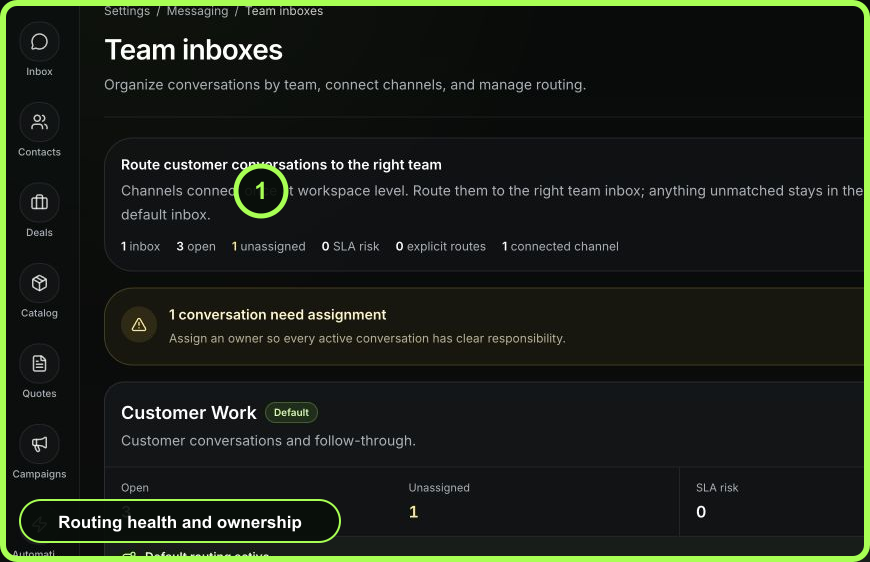
- Confirm it reaches the expected workspace and team inbox.
- Match it to the correct contact or create the minimum usable customer context.
- Assign one owner and set a next action or SLA where the workflow requires it.
- Complete the customer-facing or internal action.
- Verify the provider-backed delivery state when communication occurred.
- Record the resolution or next handoff so another teammate can continue.
- Open the dashboard and confirm remaining risk is accurately represented.
 Open full size
Review after five real cases
Do not optimize from one perfect demo. After approximately five representative cases, ask:
- Did every item reach the correct queue?
- Could the operator identify the customer without searching another system?
- Was ownership clear at every handoff?
- Did status, SLA, and next-action choices mean the same thing to everyone?
- Could a manager open the source record from a dashboard signal?
- Which repeated step is stable enough to automate—and which still requires judgment?
Change one design decision at a time, then observe another set of cases.
Launch measures
Choose two or three operational measures rather than a large dashboard wish list:
- percentage of active conversations with an owner;
- percentage of follow-ups completed by their next-action time;
- conversations resolved within the response commitment;
- quote or deal follow-ups completed by due date; or
- cases handed over without a separate request for context.
- Outcome statement agreed
- Workspace boundary confirmed
- Owner, backup, and admin named
- One approved channel or test path ready
- Status and timing rules understood
- Five representative cases reviewed
- Two or three success measures selected