
- Knowledge of the teams and customer workflows you intend to operate
Organization versus workspace
An organization represents the business that owns the WRKZY account and organization membership. A workspace is where a specific operating group handles customer work. Workspace URLs include the workspace slug, such as /w/acme-retail/inbox.
That distinction matters because the same signed-in person may belong to more than one workspace. A change made in one workspace should not be assumed to affect another.
Organization and workspace boundaries
- 01AccountOrganization
The customer account and ownership boundary.
- 02ScopeWorkspace
The operating area where customer work and configuration live.
- 03GovernOwner
Controls the organization, subscription, and highest-risk access.
- 04ConfigureAdministrator
Configures members, channels, defaults, and operating controls.
- 05OperateMember
Works customer queues, records outcomes, and escalates exceptions.
When one workspace is enough
Start with one workspace when the people handling customer work can safely share:
- the same customer and company records;
- the same connected business channels;
- the same operating currency and reporting timezone;
- the same member and role boundary; and
- the same broad administration and compliance policies.
Within one workspace, create team inboxes and saved views to separate responsibilities such as sales, support, success, or billing. A different queue does not automatically require a different workspace.
When to consider another workspace
Use a separate workspace only when there is a durable boundary, such as a different legal entity, data-access group, operating currency, or independently administered customer operation. The cost of another workspace is intentional separation: team members must switch context, channels and settings are configured in that workspace, and consolidated operating history may not appear as one continuous view.
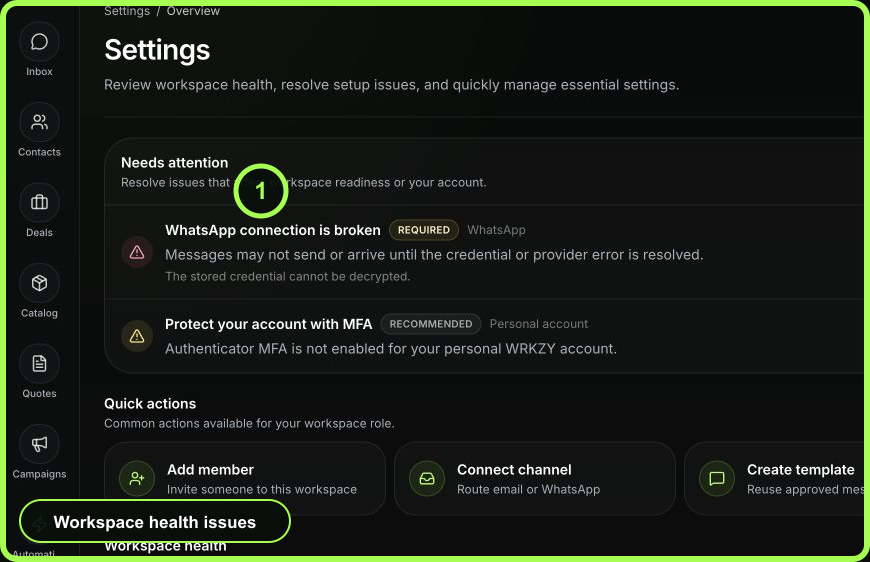
Recognize the current workspace
Before a high-impact action, use three checks:
- Read the workspace name in the application context.
- Confirm that the workspace slug immediately after
/w/matches the intended workspace—for example,acme-retailin/w/acme-retail/inbox. - Open Settings → Workspace and confirm the workspace identity and your access level when the action involves members, channels, imports, or business defaults.
This check is especially important before connecting a WhatsApp number, authorizing an email account, importing customer data, inviting a teammate, or changing currency.
 Open full size
Roles belong to responsibility
- Owner: full workspace control and the only role that can transfer ownership. Keep this assignment current and deliberate.
- Admin: can manage members and workspace settings allowed to administrators. Use only for people responsible for configuration, not as a convenience role.
- Member: works in assigned inboxes and CRM records without broad workspace administration.
A person's organization access and workspace role are related but not interchangeable. An administrator should verify the effective workspace role rather than infer access from a job title.
Example: one company, two operating teams
Suppose the same company has Sales and Support teams. If both teams need the same customer context and business channels, keep one workspace. Create responsibility-owned team inboxes only where access, identity, routing, SLA, or policy differs; otherwise use one Customer Work inbox with saved views. If the Support operation must be isolated for a different legal entity or data-access boundary, then a second workspace may be justified.
Expected result
Every teammate can identify where customer work belongs, administrators know which settings are workspace-scoped, and high-impact actions are performed in the intended URL context. The measurable outcome is fewer misrouted conversations, duplicate imports, and accidental configuration changes.
- Durable reason for each workspace documented
- Workspace URL confirmed before high-impact actions
- Role reflects responsibility rather than title
- Team inboxes or saved views used for internal separation
- Owner assignment is current