
- A customer workflow your team wants to improve
- Access to a WRKZY workspace or this public guide
The operating problem WRKZY solves
Customer work rarely stays inside one department. A WhatsApp question can become a sales opportunity; an email reply can expose a service issue; an accepted quote can create a follow-up commitment. When these events live in disconnected inboxes and spreadsheets, teams lose time answering four basic questions: Who is this customer? What happened? Who owns the next step? How will we know it is complete?
WRKZY organizes the answer around a shared workspace rather than around an individual mailbox.
From customer signal to accountable work
- 01HubCustomer record
The durable identity shared by every workflow.
- 02EvidenceTimeline and consent
What happened and which communication is allowed.
- 03SignalConversation
The current customer exchange and channel state.
- 04RevenueDeal or quote
Commercial intent, value, and buyer decision history.
- 05OutcomeOwned next action
The named person, due point, and expected outcome.
How the product fits together
| Area | What it helps the team decide | Typical evidence of completion |
|---|---|---|
| Dashboard | What deserves attention now | A risk or queue item has an owner and an action |
| Work inbox | Which shared conversation needs a reply or resolution | Status, priority, SLA, owner, next action, and message history |
| Private Mail | Which personal work email should remain private or be deliberately shared | A private thread, CRM link, or controlled context share |
| Contacts and companies | Who the customer is and how the relationship is connected | A usable Contact 360 record and activity timeline |
| Deals and pipelines | What commercial outcome is being pursued | Stage, owner, close timing, follow-up, and history |
| Catalog and quotes | What is being offered and what the buyer decided | Versioned quote, delivery state, and buyer response |
| Campaigns | Which approved audience should receive a coordinated message | Audience, content, schedule, and recipient-level results |
| Automations and AI | Which repeatable steps can be assisted safely | Execution logs or a human-reviewed suggestion |
A complete customer-work loop
Consider a customer asking on WhatsApp whether a product can be delivered this week:
- The conversation arrives in the Work inbox through a connected sender and team-inbox route.
- A Member confirms the customer identity and reads the customer context alongside the thread.
- The Member assigns the conversation, sets the priority and next action, and replies from the approved channel.
- If the request represents revenue, the team creates or updates a deal and prepares a quote from the same operating context.
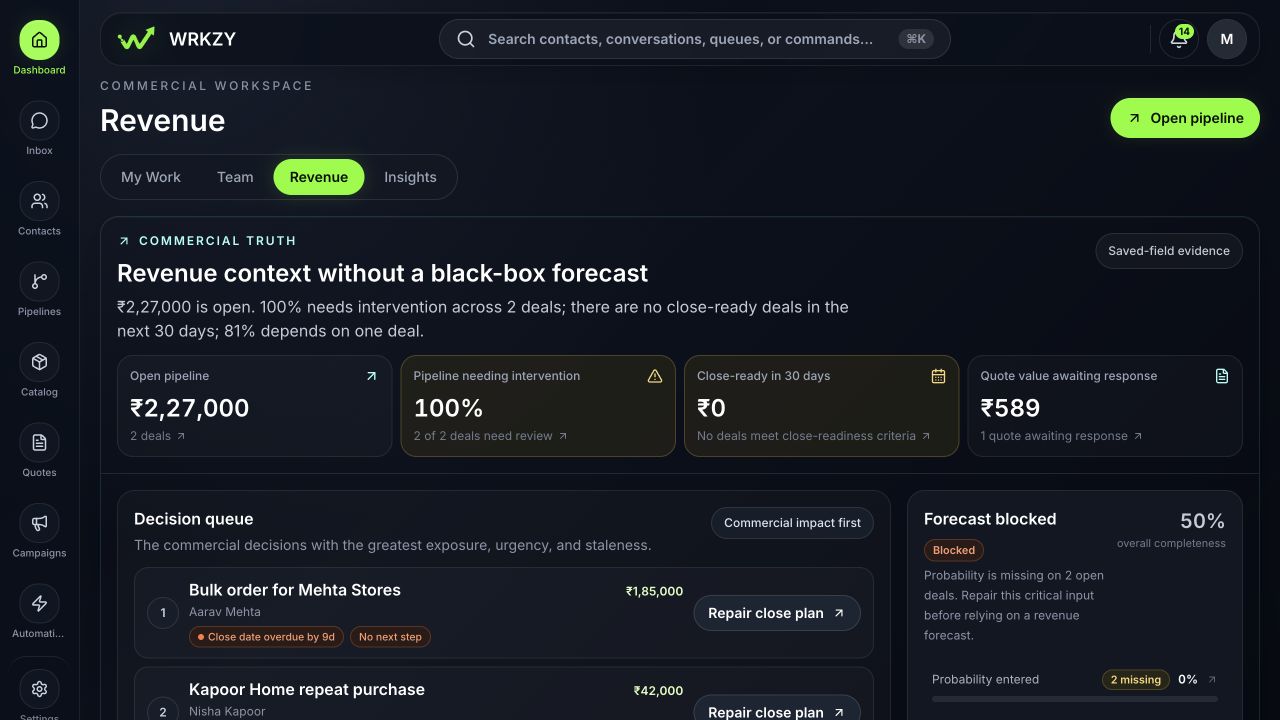
- The dashboard surfaces follow-up, SLA, quote, or deal risk until the accountable record is complete.
- The timeline and status history show the next teammate what happened without a private handoff message.
The goal is not to fill every field. The goal is to make the customer promise and its owner visible.
 Open full size
Where to begin
Do not configure every module on day one. Choose one real workflow with a visible customer outcome, for example:
- resolve incoming support conversations within the agreed response time;
- follow up every qualified sales conversation by its due date;
- create, deliver, and track a quote without losing the originating conversation; or
- import a clean customer list and give every active relationship an owner.
Then connect only the people, customer context, and channel required to run that workflow end to end. Add automation after the manual path is stable and observable.
What good adoption looks like
A useful first implementation produces operational evidence, not just configured screens:
- an incoming customer signal reaches the expected team queue;
- an authorized teammate can find the customer and relevant history;
- every active item has one clear owner and one next action;
- outgoing communication uses the intended sender and shows a delivery state;
- managers can identify risk from the dashboard and open the underlying record; and
- another teammate can continue the work without asking for missing context.
Decide your next guide
- If you are setting up the product, continue with Prepare your WRKZY workspace and Complete guided onboarding.
- If you need vocabulary, use Core concepts and glossary.
- If you are joining an existing team, choose the Owner, Administrator, or Member role guide.
- If customer messages are already arriving, begin with Work from the shared inbox.
- One customer workflow selected
- Customer context and channel connected
- Owner and next action visible
- Underlying evidence reviewed
- Outcome understandable to the next teammate