
- Active membership in the intended workspace
- Access to the team inboxes and records required for your work
- Your team's definitions for priority, pending work, SLA, and resolution
Your job in WRKZY
Members execute customer work. You use the dashboard and queues to find attention, the customer record to understand context, and workflow state to make responsibility visible. You are not expected to repair provider configuration or bypass an access boundary; escalate those conditions with precise evidence.
The Member decision loop
- 01HubCustomer record
The durable identity shared by every workflow.
- 02EvidenceTimeline and consent
What happened and which communication is allowed.
- 03SignalConversation
The current customer exchange and channel state.
- 04RevenueDeal or quote
Commercial intent, value, and buyer decision history.
- 05OutcomeOwned next action
The named person, due point, and expected outcome.
Start your workday
- Confirm the workspace name and URL before opening customer records.
- Open Dashboard → My Work and read the command brief. Treat it as a prioritization aid, not a completed diagnosis.
- Open the highest-impact underlying record and verify its actual state.
- In Inbox → Work, review My Work, Needs reply, Follow-ups, and SLA-risk or high-priority work according to team policy.
- Review notifications for assignments or changes that require attention; mark them read or clear them only after opening the source record.
- Choose one item, claim or confirm ownership, and make the next action explicit.
Handle a customer conversation
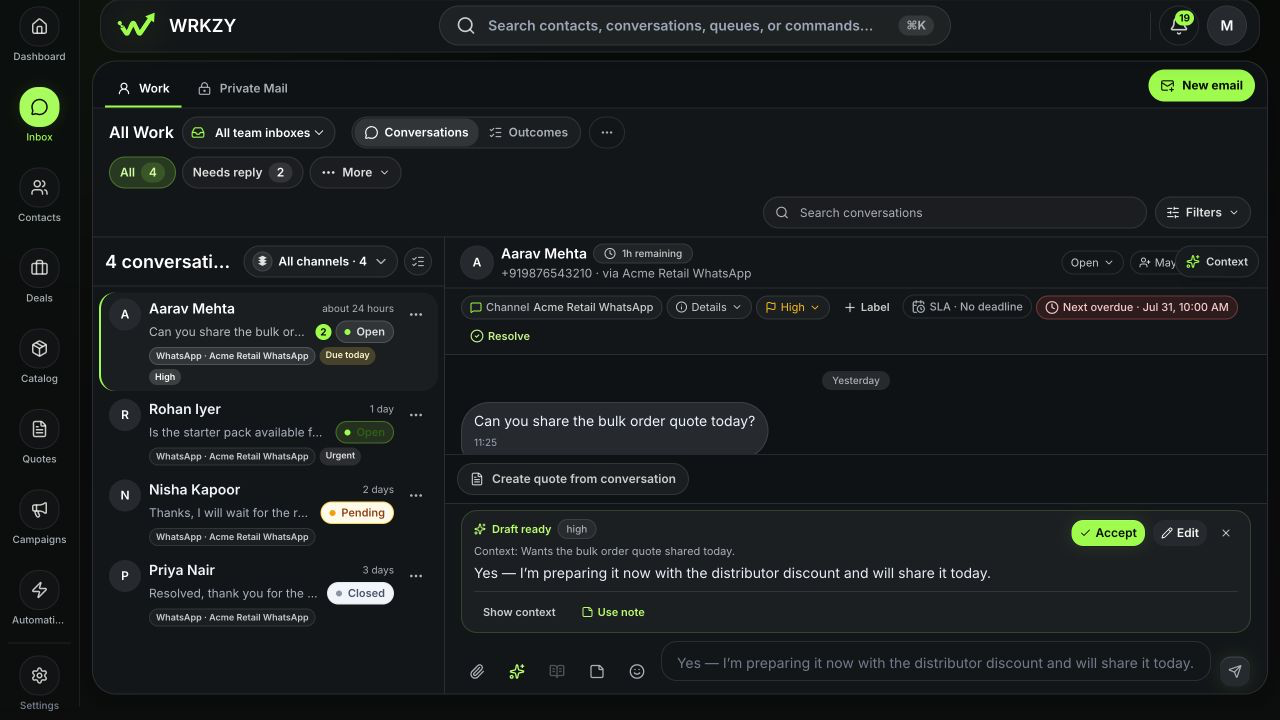
- Confirm the customer identity, channel, team inbox, and recent thread.
- Read Contact 360 or the context rail for relevant relationship, deal, quote, or activity evidence.
- If the item is unassigned and yours to handle, choose Assign to me.
- Set priority based on impact and urgency—not based on who asks most loudly.
- Set an SLA due time for the customer response commitment and a next action time for your follow-up responsibility when applicable.
- Add a concise internal note only when it supplies context not already visible.
- Reply using the intended sender, approved wording, and correct attachment or template.
- Verify the delivery state. If delivery is unclear, do not send the same content again until you know the first result.
- Set Pending when waiting with an explicit follow-up, or resolve with the correct outcome when work is genuinely complete.
 Open full size
Make every handoff self-explanatory
A good handoff contains four visible facts:
- Owner: one person accountable for the next step;
- State: open, pending, or resolved for a clear reason;
- Time: SLA or next-action date where the commitment needs one; and
- Context: the smallest note, label, or linked record needed to continue.
Avoid notes such as “please check” or “customer issue.” Write the decision: “Awaiting buyer approval; Nisha owns follow-up tomorrow 09:00; quote version 3 is the current offer.”
Use Private Mail correctly
Private Mail is visible to the mailbox owner until they deliberately share or promote context. Use it for owner-scoped work correspondence. If the team must execute the commitment, share the minimum relevant context or move it into a team-managed workflow—never copy a private mailbox into a shared space by default.
Know when to stop and escalate
Escalate to an administrator when the correct team inbox or channel is missing, sender health needs attention, a required control is unavailable because of access, or multiple records consistently route incorrectly. Escalate to your operational lead when priority, consent, customer promise, or resolution policy is unclear.
Include the workspace slug, source-record link or safe ID, timestamp, visible status, and a redacted screenshot. Never include credentials, provider tokens, one-time codes, or unrelated customer messages.
End your workday
- Clear or reassign work you no longer own.
- Review due and overdue follow-ups.
- Ensure pending items have an explicit next action.
- Confirm high-priority or SLA-risk items have an accountable owner.
- Leave internal context where another authorized teammate can continue.
- Do not close an item just to remove it from a queue.
Measurable Member success
Good operation is visible in assignment coverage, on-time follow-ups, response commitments met, truthful resolution outcomes, and fewer handoffs that require a separate explanation. Message volume alone is not a measure of customer progress.
- Correct workspace and customer confirmed
- One owner visible
- Priority and timing reflect policy
- Authorized action completed
- Delivery or source-record evidence checked
- Pending or resolution state is truthful
- Next teammate can continue without private context