
- Owner or Admin access to the intended workspace
- An approved change request or operating need
- A safe test case and rollback owner for high-impact configuration
The administrator's role
Administrators manage workspace members and settings within their allowed boundary. They should not decide customer policy alone; they implement an approved policy, make the product observable, and help operators use it consistently.
An Admin can manage day-to-day workspace access and configuration, while ownership transfer remains an Owner responsibility. Organization-level authority can also affect whether an Admin may invite a completely new organization user or only add an existing organization member.
Your operating domains
| Domain | Administrator responsibility | Proof it works |
|---|---|---|
| Members and invitations | Least role, correct status, timely removal | Person can perform assigned work and no more |
| Team inboxes and routing | Responsibility-owned queues and channel routes | Test conversation reaches expected inbox |
| WhatsApp and email | Durable company authorization and sender identity | Inbound plus outbound test and healthy status |
| Business defaults | Timezone, currency, templates, fields, and policies | Records and reports use approved defaults |
| Delivery health | Monitor connection and recipient-level failures | Recovery addresses the reason without duplicates |
| Automations and AI controls | Approval, guardrails, and human review boundaries | Logs and reviewed outputs match policy |
| Security and privacy | Sessions, consent, suppression, and evidence handling | Access and communication remain explainable |
Administration converts policy into controlled access
- 01AccountOrganization
The customer account and ownership boundary.
- 02ScopeWorkspace
The operating area where customer work and configuration live.
- 03GovernOwner
Controls the organization, subscription, and highest-risk access.
- 04ConfigureAdministrator
Configures members, channels, defaults, and operating controls.
- 05OperateMember
Works customer queues, records outcomes, and escalates exceptions.
Daily administration
- Review connection or delivery warnings before customer-facing teams begin work.
- Check unassigned and SLA-risk counts in team inboxes.
- Resolve member invitation or access problems with the least change required.
- Inspect failed campaign, quote, email, WhatsApp, or automation states before anyone retries.
- Record any temporary workaround, its owner, and when it will be removed.
Make a configuration change safely
- State the customer or operator problem in one sentence.
- Confirm the intended workspace and whether the change is Owner-, Admin-, or provider-controlled.
- Capture the current state and identify affected people, records, channels, and scheduled work.
- Choose the smallest setting that resolves the problem.
- Test with an approved internal record or recipient.
- Verify the resulting history, route, delivery state, or execution log.
- Tell affected operators what changed and what they should observe.
- Monitor the first real cases and roll back if the expected evidence does not appear.
Design team inboxes around responsibility
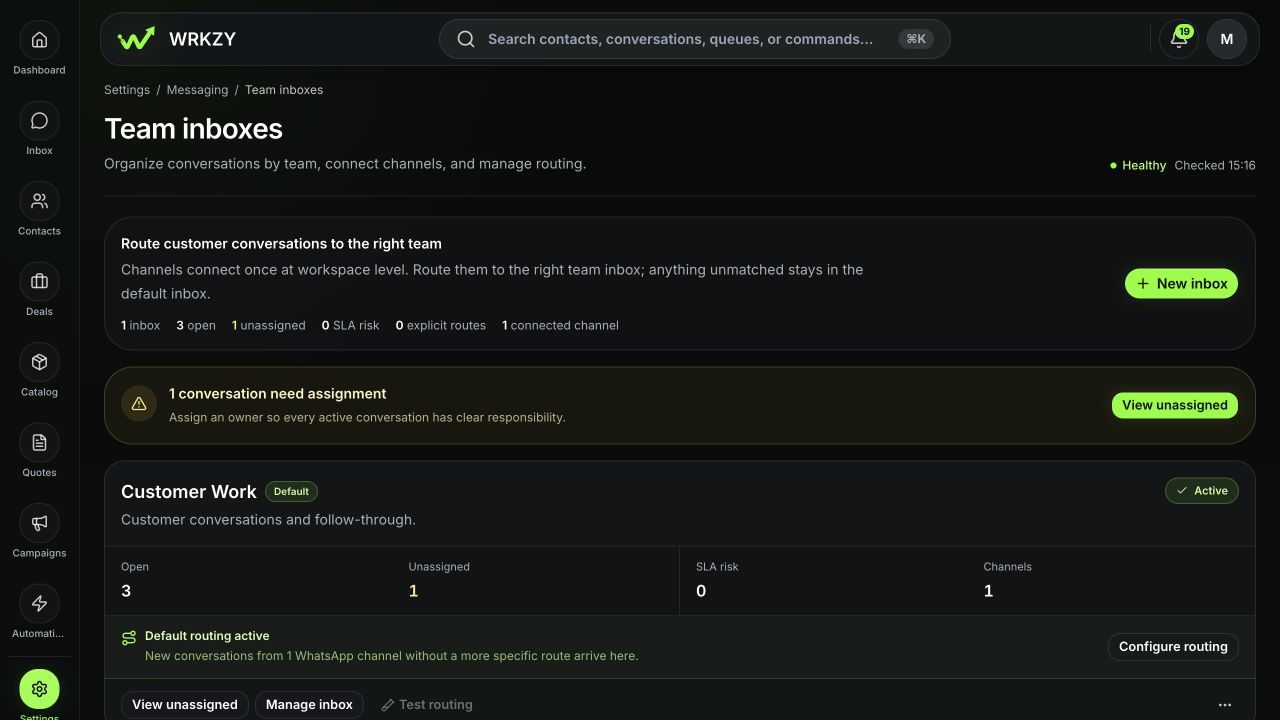
Channels connect at workspace level, then route to a team inbox. Use one default Customer Work inbox unless a team needs a different owner group, identity, SLA, hours, access, routing, or compliance policy. Saved views are usually better for categories handled by the same people under the same policy.
 Open full size
Manage access without privilege creep
- Invite a teammate as Member unless administration is part of the responsibility.
- Use Admin only for people who actively manage workspace settings or members.
- Review pending invitations; resend only after confirming the recipient.
- Disable access promptly when responsibility ends, while preserving the operating history.
- Ask the Owner to handle ownership transfer or policy decisions beyond the Admin boundary.
What not to do
- Do not share provider credentials or use a personal Meta, Google, or Microsoft account as undocumented infrastructure.
- Do not reconnect a channel before checking whether the first connection still receives or sends.
- Do not import the same customer file again to “fix” an unclear result.
- Do not publish an automation or campaign before validating audience, exception, and rollback behavior.
- Do not copy sensitive customer records into a support ticket when a safe ID and redacted crop are sufficient.
Weekly control review
Review active and invited members, team-inbox routing, default senders, delivery attention, unassigned work, automation failures, and temporary exceptions. For each issue, assign one owner and due date. A settings screen that looks complete is not sufficient; use recent operating evidence.
Measurable administrator success
Track routing accuracy, percentage of active work assigned, delivery-health recovery time, stale invitation count, and configuration changes that pass their first controlled test. Good administration reduces operator workarounds and makes failures diagnosable.
- Approved need and affected scope documented
- Least role applied
- Company-owned channels verified
- Routing tested end to end
- Delivery and execution evidence reviewed
- Rollback owner named
- Operators informed of behavior change