
- Access to at least one team inbox
- A clear operating question or a customer identifier
Start with the question
Filtering is useful only when you know what decision the result should support. Choose one:
- What must I respond to now?
- What do I personally own?
- Which active items have no owner?
- Which follow-ups or SLAs are due?
- What arrived through a specific connected sender?
- Where is the conversation for a named customer?
Build the scope from broad to narrow
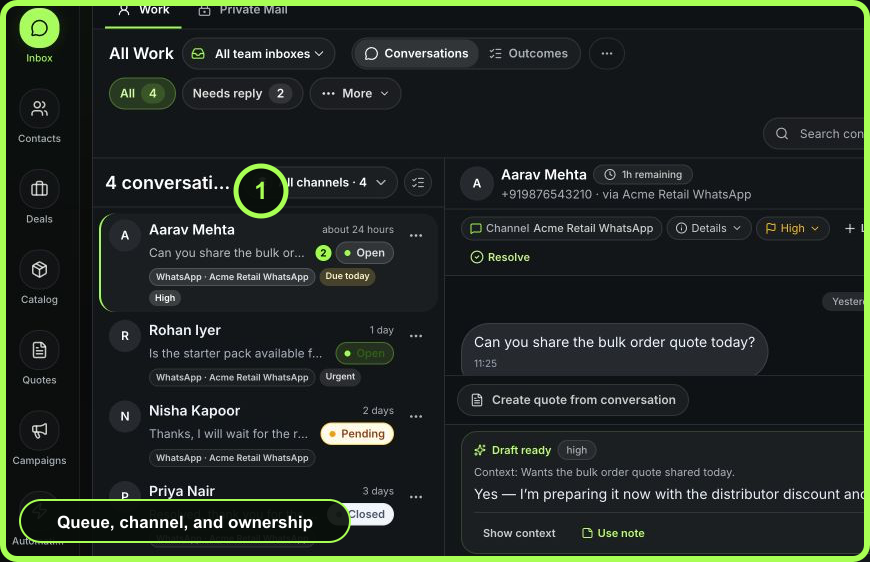
- Select Work, not Private Mail, for team-managed conversations.
- Choose Conversations rather than Outcomes.
- Choose All team inboxes or one responsibility-owned team inbox.
- Select the queue: All, Needs reply, My Work, Unassigned, Follow-ups, SLA Risk, or another available view.
- Choose All channels or a specific connected channel/sender.
- Open Filters to refine status, owner, date, unread state, and available queue criteria.
- Enter a search term only after scope is correct.
 Open full size
Use each filter for one fact
- Team inbox
- Responsibility and access scope
- Queue
- The operational condition, such as reply, unassigned, follow-up, or SLA risk
- Channel scope
- Connected provider or sender associated with the conversation
- Owner
- Mine, unassigned, or all accessible owners
- Status
- Open, pending, closed, or all
- Date
- Recency or period constraint for the conversation set
- Unread
- Message attention state, separate from workflow status
- Search
- Customer or conversation text within the current server-side scope
- Saved view
- A reusable filter combination created for recurring work
Avoid stacking filters without noticing. “No results” may mean the intersection is empty, not that no such customer conversation exists.
Find a known conversation
- Confirm the workspace.
- Begin with All team inboxes and a broad queue if you do not know the owner or status.
- Search a distinctive customer value such as full name, email fragment, phone ending, or message phrase.
- Compare channel, recency, status, and a second customer identifier before opening.
- If not found, remove one constraint at a time: unread, status, owner, queue, channel, then team inbox.
- Use Command Lens for a cross-area contact or recent-conversation search; use Contacts for customer-record search.
Build an operating queue
Example: to find unassigned WhatsApp work in the default Customer Work inbox:
- select Work → Conversations;
- choose Customer Work;
- choose Unassigned;
- set the WhatsApp sender under channel scope; and
- sort or review visible SLA and priority badges before assigning.
For a recurring question, ask an administrator whether a saved view is appropriate. Use a separate team inbox only when responsibility or policy is genuinely different.
Read counts correctly
Counts reflect the current server-side workspace and queue scope. A conversation may qualify for several queues, so do not add queue counts to estimate unique records. Counts can also change while you work as messages arrive, owners change, or teammates resolve items.
Empty states and recovery
- Expected customer missing: clear filters progressively and verify the workspace and channel.
- Search finds several people: compare contact details and thread history; do not assume the most recent is correct.
- Queue count and list differ briefly: refresh; another session or realtime event may have changed state.
- A saved view looks wrong: inspect its configured template/filter criteria and current team-inbox access.
- Other or Quarantine appears: treat it as inbound email triage. Quarantine management may require elevated access; review before promoting content.
- A deep link opens no selected thread: the record may no longer be in the current scope. Broaden filters, then verify permission or archive state.
Measurable value
Good filters reduce time to find the next valid record and reduce work left unassigned or overdue. Review whether a saved view produces decisions; delete or redesign views that merely reproduce All Work with a different name.
- Operating question stated
- Workspace and Work/Private boundary confirmed
- Team inbox and queue chosen first
- Filters added one fact at a time
- Customer verified with two identifiers
- Empty result debugged by removing constraints
- Saved view maps to a recurring decision