
- Access to the intended WRKZY workspace
- At least one team inbox or Private Mail account when following in the product
Two visibility modes
Work
Work contains team-managed conversations from connected workspace channels. Authorized team members can find the thread, see its workflow state and customer context, assign responsibility, reply, and resolve an outcome.
Private Mail
Private Mail connects an individual's work mailbox. Only its owner can see unshared mail. Matching a CRM contact does not make the thread, subject, participants, messages, or attachments team-visible. The owner decides whether to link CRM context, share an approved scope, delegate an outcome, share selected messages, or move future replies to Work.
Private by default, deliberately shared
- 01PrivatePrivate Mail account
Mailbox connection belongs to its individual owner.
- 02PrivateOwner-only message
Content remains invisible to the workspace by default.
- 03BoundaryControlled context share
The owner deliberately shares only what teammates need.
- 04SharedTeam-visible work item
Shared context becomes accountable customer work.
- 05ControlRevoke when no longer needed
Remove access when the operational purpose ends.
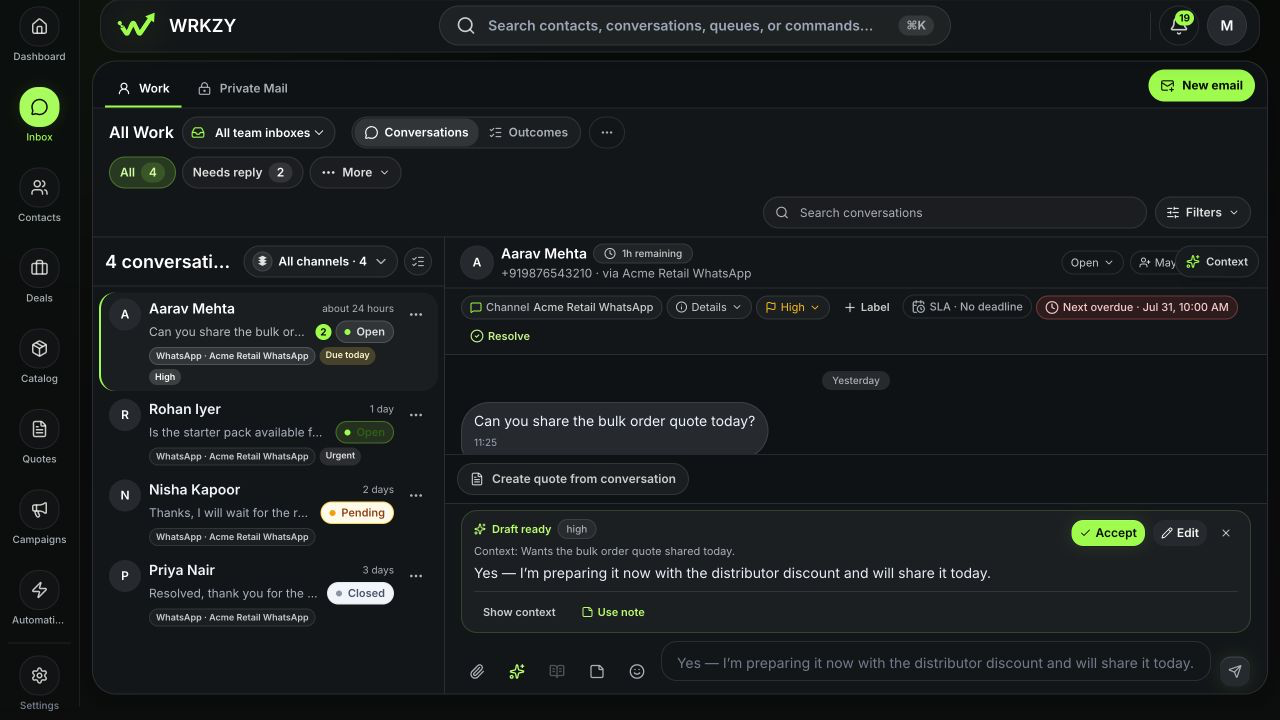
The Work inbox anatomy
- Work/Private Mail switcher
- Changes the visibility and operating model, not merely a filter
- Team inbox selector
- Limits Work to a responsibility-owned inbox or all team inboxes
- Conversations/Outcomes switcher
- Changes whether the queue contains communication threads or accountable outcome objects
- Queue chips
- All, Needs reply, and additional views such as My Work, Unassigned, Follow-ups, SLA Risk, and High priority
- Channel scope
- Limits results to all or a connected channel/sender
- Conversation list
- Shows customer, recency, channel, status, unread, priority, and due cues
- Thread
- The customer messages and replies
- Workflow bar
- Channel, details, priority, labels, SLA, Next action, and Resolve controls
- Context rail
- Customer and related operating context used to decide the next action
- Composer
- Message, attachment, template, AI-draft review, quote, and channel-specific reply controls
 Open full size
How a conversation reaches Work
A supported channel is connected at workspace level. A team-inbox route determines which responsibility-owned queue receives a new conversation. Anything without a more specific route can remain in the default inbox. Assignment then names the individual accountable for the next step.
These are separate controls:
- Connection establishes provider access.
- Routing chooses the team inbox.
- Assignment chooses the person.
- Status, priority, SLA, and Next make the operating state explicit.
- Resolution outcome records how the work ended.
From provider to accountable conversation
- 01SourceConnected channel
WhatsApp, shared email, or another supported source receives the message.
- 02RouteTeam inbox
Channel rules place the conversation with the responsible team.
- 03TriageQueue and priority
State, SLA, and filters determine when it needs attention.
- 04OwnAccountable owner
One teammate becomes responsible for the outcome.
- 05ActReply, resolve, or follow up
The conversation ends with a visible result or next action.
Queues answer different questions
| Queue | Question it answers |
|---|---|
| My Work | Which conversations am I accountable for? |
| All Work | What is active across my accessible team scope? |
| Needs reply | Where does the current state indicate a customer response is needed? |
| Unassigned | Which conversations lack an individual owner? |
| Follow-ups | Which Member-owned next actions are scheduled or due? |
| SLA Risk | Which response deadlines are near or overdue? |
| High priority | Which records have been deliberately marked high or urgent? |
| Outcomes | Which accountable results, including at-risk or completed work, need review? |
A conversation can appear in more than one queue. For example, an urgent unassigned conversation with an overdue SLA belongs to three attention views. That is not duplication; it is one record answering three operational questions.
Conversation state is not delivery state
Open, Pending, and Closed describe the team's work. Sending, Sent, Delivered, Read, and Failed describe a message's provider lifecycle. A conversation can be Pending while its last email is Delivered; a Closed conversation can still contain a failed message that should be investigated.
What healthy inbox operation looks like
- New messages reach the intended team inbox.
- Active work has a person accountable for the next step.
- Priority reflects customer impact and urgency.
- SLA represents the response commitment; Next represents the operator's follow-up.
- Internal notes add decisions, not duplicated transcripts.
- Customer replies use the intended sender and show provider evidence.
- Resolution captures a truthful outcome.
- Private Mail shares only the minimum approved context.
A simple daily rhythm
Start with SLA Risk and Needs reply, then Unassigned, My Work, and Follow-ups. Work one source record at a time. End by ensuring every pending item has a visible future action and every high-risk item has an owner.
- Work and Private Mail visibility understood
- Team inbox and individual assignment distinguished
- Queue chosen for the operating question
- Workflow and delivery state kept separate
- Customer context reviewed
- Resolution or next action visible