
- Access to the conversation
- The team's definitions for Open, Pending, Closed, priority, and SLA
- An accountable owner for active work
Keep the controls distinct
- Open
- Active customer work that can move now
- Pending
- Waiting for a customer, teammate, dependency, or scheduled next step
- Closed
- Customer work is resolved with a recorded outcome
- Low/Normal
- Routine work within ordinary commitment
- High/Urgent
- Elevated impact or urgency according to team policy
- SLA due time
- Customer-response deadline used by SLA-risk and overdue views
- Next action time
- Owner's scheduled follow-up used by Follow-ups and due-work views
Priority does not create an SLA. Pending does not create a follow-up. Closing does not prove the last message was delivered. Configure each fact explicitly.
Work state and message state are different lifecycles
- 01LocalPrepared
Content and recipient are ready but nothing has left WRKZY.
- 02PendingSubmitted
WRKZY handed the request to the connected provider.
- 03AcceptedProvider accepted
The provider accepted processing, not necessarily delivery.
- 04ResultDelivered or failed
A terminal provider event confirms delivery or an exception.
- 05RecoverException reviewed
An owner diagnoses, recovers safely, or escalates with evidence.
Set or change priority
- Open the conversation and verify customer, channel, and latest message.
- Select the priority control in the workflow bar.
- Apply the team's decision rule:
- customer harm, severe business impact, or a near-term commitment may justify Urgent;
- material impact requiring early attention may justify High;
- routine work remains Normal or Low.
- Add an internal note only when the reason is not evident and another person must understand it.
- Confirm the badge and relevant queue update.
Do not elevate priority to compensate for missing ownership or a misconfigured SLA.
Set an SLA due time
- Confirm the response commitment and the timezone in which it is understood.
- Select SLA.
- Choose 1 hour, 4 hours, Tomorrow 9 AM, or enter the required timestamp.
- Confirm the control changes from No deadline set to the expected status.
- Use SLA Risk or overdue queues to monitor the commitment.
If the deadline passes, the conversation shows an overdue cue. Respond or explicitly manage the customer expectation; merely moving the SLA removes the signal without repairing the miss.
Set a Next action
- Name the future action and owner.
- Select Next.
- Choose Later today, Tomorrow 9 AM, Next business day, or a precise time.
- Use Pending when work is genuinely waiting.
- Verify the item appears in Follow-ups at the expected time.
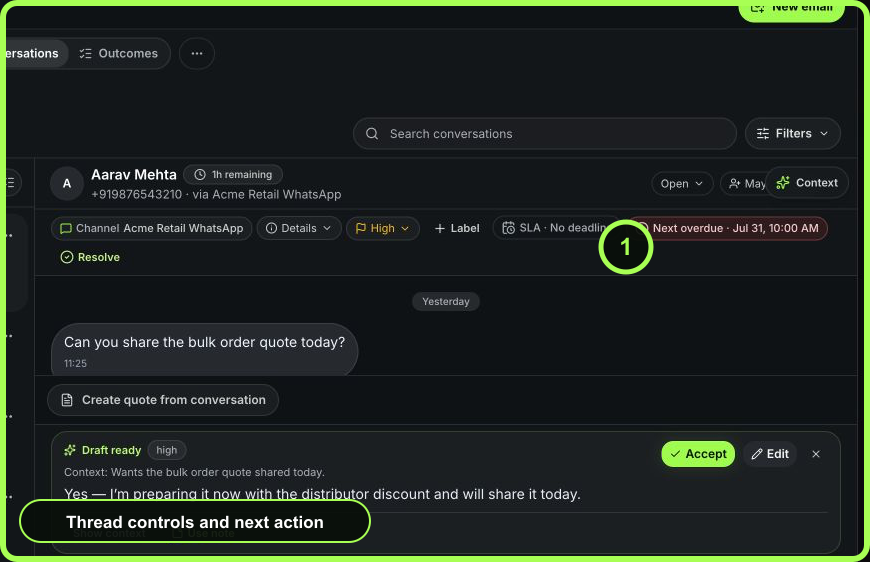 Open full size
Move between statuses
Keep Open when
The team can act now, a reply is required, or an unresolved action has no legitimate dependency.
Use Pending when
The next move depends on a customer, teammate, provider, scheduled time, or other explicit event. Pair it with ownership and a Next time when the team must revisit it.
Resolve/Close when
The customer outcome is complete or the team has a truthful terminal outcome. Select the appropriate resolution outcome and add a note where the reason needs explanation. Open accountable outcomes can prevent or complicate resolution; complete or deliberately manage them first.
Examples
- Urgent + Open + SLA 1 hour: a customer cannot access a paid service and needs a response now.
- High + Pending + Next tomorrow 09:00: a buyer is reviewing a time-sensitive quote; the owner will follow up tomorrow.
- Normal + Closed: a routine information request was answered, delivery was verified, and no further commitment remains.
Recover incorrect state
- If status was changed accidentally, reopen or restore the correct state immediately and record the real next action.
- If a concurrent update was skipped, refresh before retrying; another operator may have changed the record.
- If the customer replies to a Pending item, review the new message and move it back to active work as needed.
- If delivery failed after closure, reopen the customer work or create the correct recovery action; do not rely on the closed state.
- If the SLA is wrong across many records, ask an administrator to review the team-inbox policy before bulk-changing symptoms.
Measurable result
Healthy use reduces stale Pending work, priority inflation, overdue SLA, and closed conversations that reopen because the outcome was not complete. Audit a small weekly sample for truthful state, not just queue counts.
- One owner visible
- Status matches actual ability to act
- Priority follows agreed rule
- SLA represents customer response promise
- Next represents owner follow-up
- Delivery checked separately
- Resolution outcome is truthful