
- Access to the Deals area and relevant pipeline
- A clear review question: execution, stage flow, record comparison, or forecast
- Sufficient deal ownership, stage, value, currency, and timing data for that view
View selection guide
| View | Best for | Do not use it to |
|---|---|---|
| Work | Decide what the team must act on next | Reconstruct every stage or forecast total |
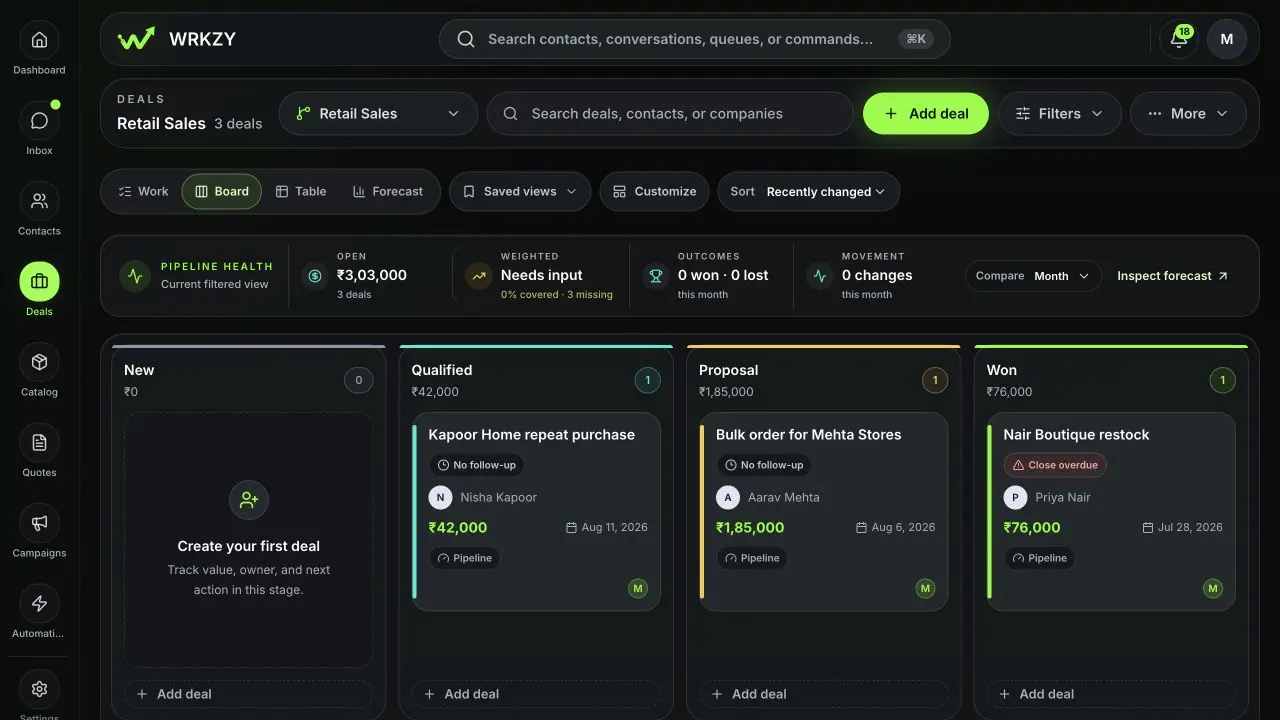
| Board | Inspect flow and move individual deals between stages | Make broad field updates without opening context |
| Table | Compare many fields and apply reviewed priority or forecast changes | Infer customer evidence from a dense row |
| Forecast | Review period value, weighted value, categories, owners, targets, and coverage | Replace the owner’s deal-level judgment |
Work: start the day here
Work organizes open deals into Needs action, Awaiting customer, Awaiting us, Overdue, Unassigned, Quote pending, Stalled, and Data gaps. Open the reason shown on a card; WRKZY explains the detected condition and recommends a next action. Fix the underlying record rather than trying to remove it from the queue cosmetically.
Board: inspect stage flow
Board groups deals by pipeline stage and makes movement visible. Drag or move a deal only after checking the evidence required by the destination stage. Moving into Won or Lost opens an outcome confirmation. Stage rules may prevent skipping, moving backward, or advancing a high-value deal without approval.
 Open full size
Table: review and normalize
Table supports configurable columns, sorting, row selection, inline stage movement, and bulk changes to priority or forecast category. It is useful for a weekly pipeline hygiene review. Select a narrow set, validate that one decision applies to every row, and inspect the result after the bulk action.
Forecast: inspect a period
Forecast filters open deals to a month or quarter by expected close date, then reports open and probability-weighted value. Categories are Commit, Best case, Pipeline, and Omitted. Probability coverage reveals how many in-period deals have usable probability evidence. Workspace currency setup and exchange rates determine whether multi-currency totals can be combined reliably. Authorized managers can set overall or owner targets.
Example operating rhythm
- Daily: use Work for customer and team commitments.
- During pipeline review: use Board for flow and Table for data gaps.
- During forecast review: use Forecast by period and owner, then open outlier deals.
- Before changing a deal: use the Deal Room for the full history and customer evidence.
If counts differ between views
Check pipeline selection, open versus closed status, archive state, view filters, expected close period, owner filter, and currency readiness. A deal can correctly appear in Board but not Forecast when it has no close date in the selected period.
- Decision defined before choosing a view
- Filters and pipeline selection checked
- Underlying deal opened for consequential changes
- Bulk actions limited to reviewed rows
- Forecast gaps resolved at deal level