
A customer reports a duplicate charge in the shared support inbox. Support understands the complaint. Finance can verify the payment. The account owner still needs to tell the customer what happens next.
This is how an ordinary billing question turns into an architecture debate: should the administrator create a Finance workspace, a Finance team inbox or simply assign the review to one person?
The largest boundary can feel like the most serious answer. It can also separate the customer from the context the reviewer needs. Use the smallest boundary that makes responsibility accurate: an assignment changes the person carrying the next decision; a team inbox changes the policy for a durable group; a workspace changes the operating and access foundation.
For access decisions, this aligns with NIST’s definition of least privilege: grant only the authorizations and resources needed for the assigned task. A new workspace is appropriate only when that narrower grant cannot express the real operating boundary.

Ask what really needs to change
Begin with the operating difference the team needs, not the product control that happens to be easiest to find.
If only the next responsible person changes, assign the work. If a durable group needs different visibility, channel routing, assignment behavior, working hours, service targets, or escalation policy, consider a team inbox. If customer data, members, roles, connected accounts, business defaults, or another lasting access boundary must be separate, consider another workspace.
| Choice | Use it when | What normally stays shared | Evidence after the change |
|---|---|---|---|
| Assignment | One authorized person accepts the next decision | Workspace, customer context, team route, and operating policy | Named assignee, specific next action, and due point where needed |
| Team inbox | A durable group needs its own responsibility or queue-level policy | Customer records and broad workspace administration | Purpose, membership, route, assignment behavior, and service state |
| Workspace | The operating, data, access, account, or business foundation differs | Organization relationship may remain; operating context is separated | Active workspace identity, members, channels, defaults, and records |
A saved view or list is smaller still. Use it when the same people, access, channels, customer context, and policies apply and the team only needs another recurring lens on shared work.
Assign when one person needs to decide
In the billing example, Support, Finance and the account owner still need the same customer, conversation, payment reference and business context. One finance reviewer needs to confirm whether the charge is duplicated. That is an ownership change, not a new operating foundation.
The responsible teammate should accept the assignment and see an executable next action. A clear entry might say: “Compare the two charges against payment reference 4187 and confirm the refund decision by 15:00.” It identifies the decision, source and timing. “Finance to check” leaves the team to rediscover all three.
A team-inbox route and an individual assignment are different states. The route says which group receives the work. Assignment says which person must move the next decision. Status, priority, SLA, notification, and next-action time add information, but none substitutes for a responsible owner.
Use unassignment only when work is deliberately returning to a staffed triage queue. Do not use it to mean “not mine,” “waiting,” or “somebody else should decide.” When responsibility transfers, preserve the current customer promise, the reason for the handoff, and the source record.
See how to assign conversations and next actions for the complete operating checklist.
Create a team inbox when the group policy changes
A team inbox is an operating boundary inside a workspace. It answers what belongs in the queue, who can see and work it, which supported channel routes feed it, how assignment behaves, and when work becomes late.
Create a purpose-built team inbox when the difference is durable. Billing disputes may require restricted membership, a dedicated shared-email route, different working hours, a fallback owner, and a response target that does not apply to general customer work. Those are inbox-level reasons. One quote review is not.
Before creating another inbox, write down:
- the customer outcome the group can finish;
- who needs visibility and which inbox role they require;
- which WhatsApp sender or shared email route should enter it;
- whether work is assigned manually or through a configured strategy;
- the fallback or overflow destination;
- working hours, service targets, and waiting-state policy; and
- the staffed owner for escalation and unassigned work.
Workspace roles—Owner, Admin, and Member—are separate from team-inbox roles such as Manager, Member, and Viewer. Configure the workspace role from the person’s administrative responsibility, then narrow queue-level access through inbox membership. Do not promote someone to Admin merely because a restricted inbox or a specific control is unavailable.
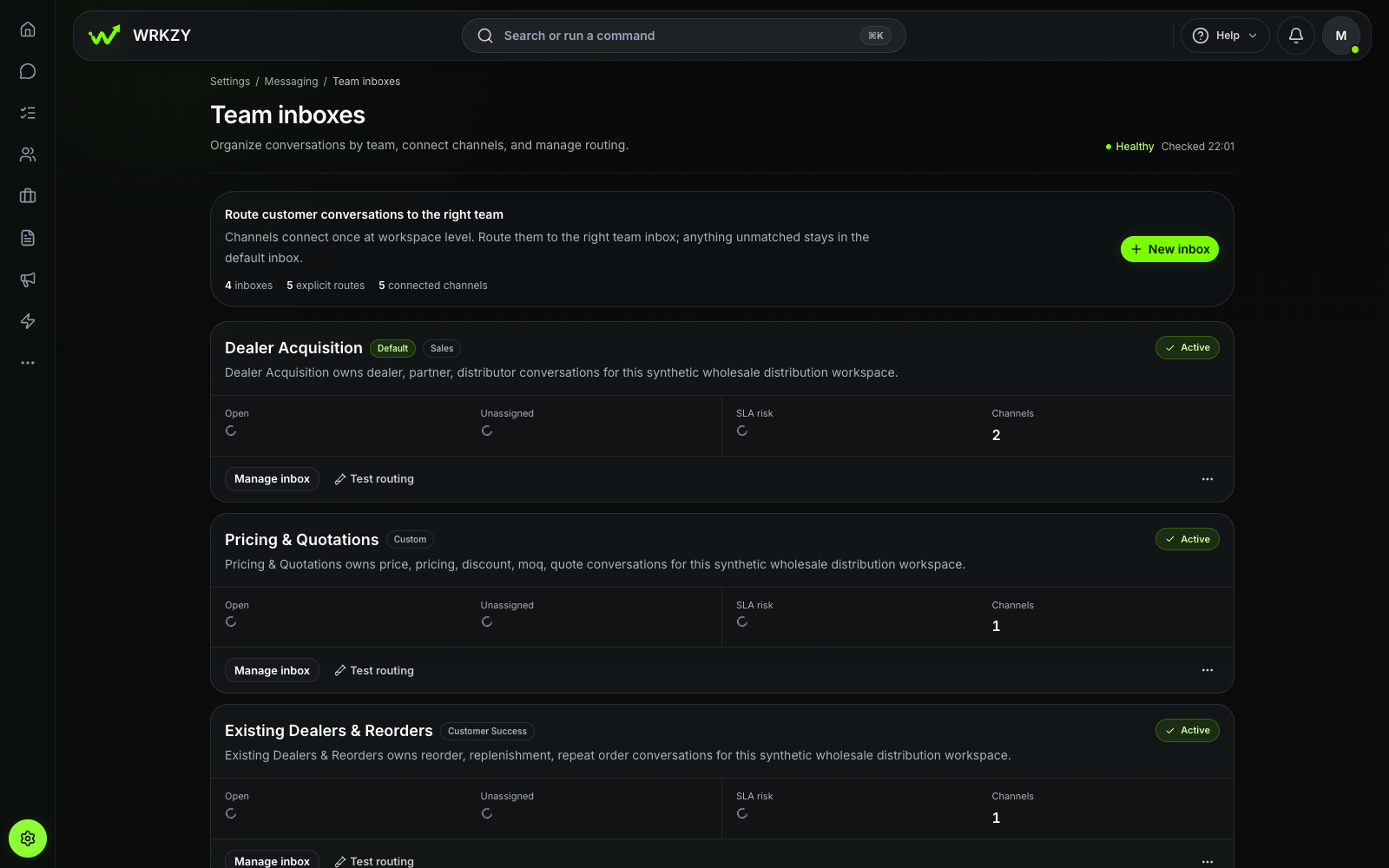 Current productTeam inbox routing and workload healthOpen larger ↗
Evidence boundaryThis capture shows the configured synthetic team inbox at the recorded commit; routing results depend on each workspace setup.
The screenshot shows an important distinction: work can reach the correct team inbox and still have no individual assignee. After saving an inbox, test one safe incoming example through each primary route and confirm the expected inbox, assignee or unassigned state, priority, and service timestamps. A routing preview confirms the configured choice for its input; a controlled incoming test checks the complete route.
Team inbox and connected-account capacity is plan-controlled. Do not design around an assumption of unlimited inboxes, routes, or workspaces.
Create a workspace only when data or access must be separate
A workspace is not a folder, temporary project, campaign, region label, or reporting filter. It scopes people, customer records, connected channels, team inboxes, settings, and day-to-day work. A person may belong to more than one workspace, but a change in one should not be assumed to affect another.
Start with one workspace when the team can safely share:
- customer and company records;
- connected business channels;
- operating currency and reporting timezone;
- member and role boundaries; and
- broad administration, privacy, and compliance policies.
Consider another workspace when a lasting boundary truly differs—for example, a separate legal entity, independently administered customer operation, data-access group, connected-account set, operating currency, or business policy. Multiple workspaces can sit within one organization, subject to plan capacity.
The separation has a cost. Members must work in the correct context. Channels and settings are configured again. Customer records and operating history do not become one continuous shared view merely because the workspaces belong to the same organization. A new workspace does not automatically copy the current workspace’s people, channels, templates, records, or policies.
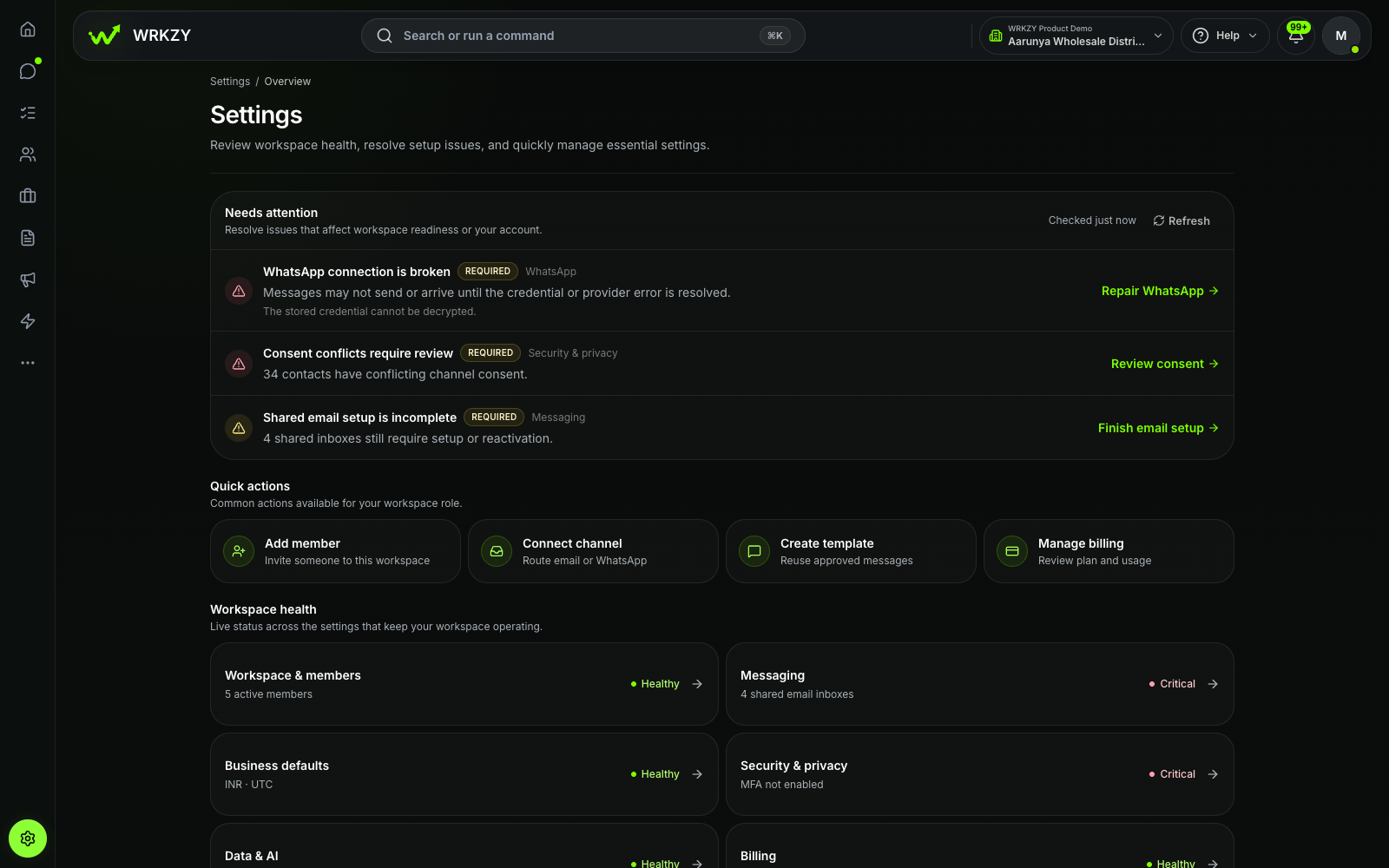 Current productWorkspace health and setup actionsOpen larger ↗
Evidence boundaryThis capture shows available settings and health notices only; it does not establish that every integration is configured.
Before connecting a sender, importing customer data, inviting a member, or changing business defaults, confirm the active workspace name and the slug immediately after /w/ in the URL. The Settings screen can expose configuration health, but the administrator must still verify that the action is happening in the intended workspace.
Start with the smallest change
Return to the duplicate-charge request. The administrator can work through the boundaries in order:
- Is the customer operation itself separate? No. Support, Finance, and the account owner are handling the same customer, channel, currency, and payment question. A new workspace would fragment the story.
- Does Finance need a durable queue policy? Not for this single review. If Finance owns a recurring class of restricted billing disputes with its own route, membership, hours, and service target, a Finance team inbox may become justified.
- Who owns the next decision now? One finance reviewer has accepted the payment check. Assign the conversation or linked task and preserve the due action.
- Where does the result return? Record the confirmed charge or open exception beside its source, then return the customer-facing reply to the account owner.
This sequence keeps one customer story intact while making the temporary responsibility explicit. Structure follows a durable operating difference instead of replacing a precise handoff.
Test the structure with a real customer request
Run a small boundary review after five representative cases rather than judging the design from one perfect test.
- Can each teammate identify the active workspace before a high-impact action?
- Did each signal reach the intended team inbox?
- Could the assignee see the source and complete the next decision?
- Did restricted membership match the intended audience?
- Were any items transferred between queues because the purpose was unclear?
- Did another workspace or inbox force someone to reconstruct customer context?
- Does every structural boundary still have a documented, durable reason?
Track median time to first owner, percentage of active work assigned, age of unassigned items, wrong-queue transfers, overdue next actions, and cases that required a side conversation after a handoff. Also review cross-workspace mistakes such as a connection, import, invitation, or setting changed in the wrong context.
The right answer is not always the fewest structures. It is the smallest set of boundaries that keeps access and responsibility accurate without breaking the customer story.
For a channel-specific example, the WhatsApp App, Platform, and CRM comparison separates messaging infrastructure from team ownership and customer records.
Explore WRKZY Workspaces to compare workspace, team-inbox, assignment, and saved-view boundaries before adding structure.