
Every team has a task that makes automation irresistible: add a known tag, assign a routine enquiry, remind an owner that a reply is due. The rule is clear, the work repeats and nobody learns anything by doing it manually for the hundredth time.
Then there is the task that only looks repetitive. A message arrives, but the customer’s intent is ambiguous. A deadline appears in the record, but the commercial terms have changed. The “obvious” next action would make a promise somebody still needs to review.
“Can we automate this?” is the easy question. The useful one is: “Can we explain when it should start, what it may use, what it may change, where it must stop and who will know whether the outcome was right?”
The short answer is practical: automate work that is predictable and easy to reverse; add review when the rule is clear but the consequence matters; keep the decision with a person when the context is ambiguous or the commitment is hard to undo.

Start with two questions: is it predictable and is it risky?
Two questions provide a practical first filter:
- How predictable is the decision? Can another trained teammate reach the same answer from the same approved facts and rule?
- How consequential is the action? How difficult would it be to reverse an incorrect message, assignment, price, deadline, permission, or record change?
The NIST AI Risk Management Framework is a useful primary reference when this assessment extends beyond workflow design into formal AI risk governance, testing, and accountability.
Apply the matrix to real customer work:
| Example | Predictability and consequence | Best starting treatment |
|---|---|---|
| Add an approved tag and assign a new conversation from a narrow trigger | Predictable and reversible | Automate the configured path |
| Prepare a reply from a long or ambiguous thread | Ambiguous but still reviewable | Use AI assistance; a person decides what to send |
| Send an approved reminder after a verified event | Predictable but customer-facing | Automate only after design, test, release, suppression, and monitoring controls are clear |
| Change a price, deadline, permission, or sensitive commitment | Ambiguous or materially consequential | Keep the decision with an authorized person |
An action does not become safe merely because a tool can execute it. Equally, a workflow does not become an AI agent merely because it performs several predefined steps. The article on AI assistance, configured automation, and future agents explains that distinction.
Write down the rules before building the automation
Before opening the builder, explain the automation in five parts:
- Outcome: the customer or operating result the workflow is meant to support.
- Entry rule: the trigger, eligible records, approved context, and suppression rules that decide what may enter.
- Ordered path: the exact conditions, actions, waits, and destinations the workflow may use.
- Control path: the stop, approval, timeout, failure, retry, and human-handoff rules.
- Accountability: the owner, completion evidence, monitoring window, and rollback plan.
If one part is vague, keep the workflow in draft until the team can make it explicit. This is not paperwork for its own sake. It is the explanation an operator will need when a run does something unexpected.
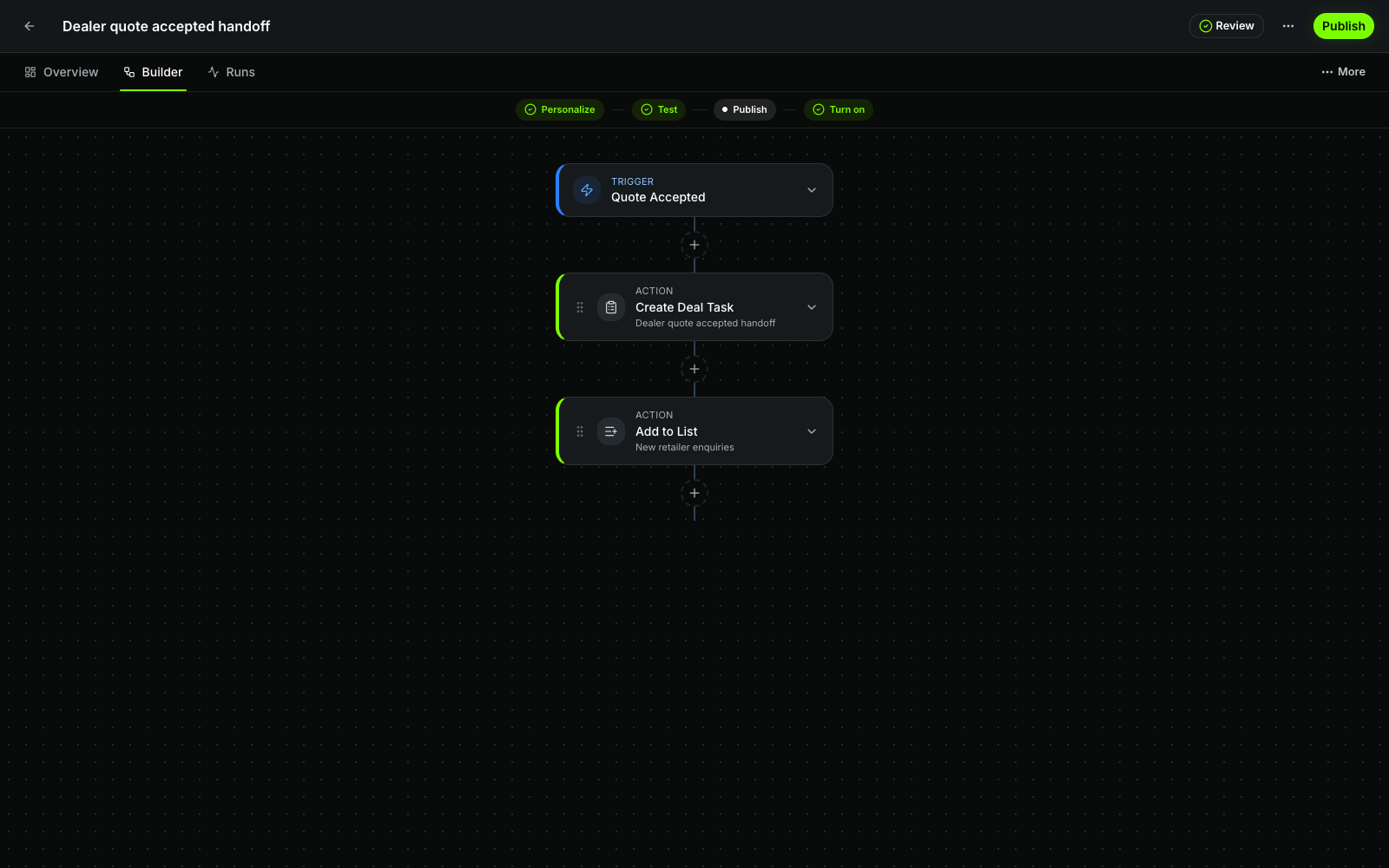 Current productQuote-accepted handoff workflowOpen larger ↗
Evidence boundaryThis capture shows a seeded workflow configuration; it does not show an activation, production run or guaranteed outcome.
The builder describes intended behavior. It is product evidence for configuration and release controls, not proof of execution. A live run needs its own trigger context, published version, step trace, action outcome, and receipt.
Saving is not launching
Saving a workflow is not the same as proving or running it. Move through the lifecycle deliberately:
- Review the draft for missing fields, invalid references, incomplete branches, and unsafe activation rules.
- Test the current draft with controlled records that cover qualifying and non-qualifying paths.
- Approve the design when the team’s role and risk policy requires a separate reviewer.
- Publish an immutable version only after the current configuration and business outcome are understood.
- Turn on that published version so it may accept eligible events.
- Inspect the first production runs, including successful paths, skipped work, waits, partial outcomes, and failures.
The Help Center explains how to test, approve, publish, and activate an automation. Keep those gates distinct: approval does not prove a test, publication does not turn the workflow on, and a Live state does not prove that a particular customer action completed.
Test the boring cases—and the awkward ones
Before broad activation, exercise representative examples:
- the expected positive path;
- a record that should not qualify;
- missing or empty context;
- duplicate events;
- a changed owner;
- an unavailable connection;
- a customer who should not receive the action;
- each meaningful wait or timeout branch; and
- a retry after a temporary failure.
Where the same event can arrive twice, the second run should not create a duplicate message, task, or record unless duplication is explicitly intended. For any customer-facing test, use authorized records and verify the actual destination instead of treating a green test screen as the business outcome.
“Needs review” is a healthy result
An automation does not only succeed or fail. It may encounter missing context, conflicting ownership, an unavailable channel, an expired permission, an uncertain external result, or a customer case outside the expected path.
Route these conditions to visible review instead of silently skipping the work or retrying indefinitely. The responsible operator should be able to see:
- what triggered the run;
- which published version and context it used;
- which steps succeeded, failed, skipped, or remain waiting;
- whether a customer or external effect completed, was safely reused, or is uncertain; and
- who owns the next decision.
An exception does not always mean the automation was designed badly. It may mean the automation stopped exactly where a person needed to decide. Open Runs and review the smallest relevant execution before retrying, editing, or rolling back. The automation logs and receipts guide explains how.
A successful run does not guarantee a good customer outcome
A successful execution is not automatically a better customer outcome. Review three layers separately:
- Execution evidence: Did the intended trigger, published version, branch, wait, action, and receipt behave as configured?
- Operational outcome: Did the right owner receive actionable work, resolve the exception, and complete the next step without extra reconstruction?
- Customer outcome: Did the commitment remain accurate, the handoff complete, and the customer receive the intended result?
WRKZY run evidence can explain what the configured workflow attempted and observed. Your team still needs to judge whether that activity improved the operating and customer outcome. A workflow can achieve a high completion rate while creating confusing tasks, inaccurate commitments, or more investigation downstream.
If automation creates more investigation than it removes, narrow the entry rule or ordered path. If it repeatedly reaches the same exception, make the handoff explicit or return that decision to a person. Automation should make responsible work easier to see and complete, not make responsibility disappear behind a green status.
The 30-day CRM implementation checklist places automation after live workflow, ownership, channel, and failure-path testing.
Choose the next step based on where you are today
If you are evaluating the product, explore WRKZY automations and inspect how trigger, steps, review, testing, publication, activation, and run evidence remain distinct.
If you are building the first draft, follow Create and validate an automation. If you are releasing it, use the test, approve, and activate guide. If you are operating live work, begin with run logs and receipts.