
At 9:10 on Monday morning, a support lead asks AI to summarize a 37-message thread before she calls the customer. The summary is tidy and confident. It also says a refund was approved when the conversation only shows that the customer requested one.
She checks the source, corrects the summary and decides what to do next. That is AI assistance: the system proposes; a person decides.
Now compare it with a configured automation. An event starts a route the team designed in advance, and the workflow follows the approved conditions, waits and actions. It may do several things without another click, but it is not inventing the route as it goes.
An agent carries more discretion. It may choose among permitted tools and intermediate steps in pursuit of a goal. That extra freedom is the important difference—not the chat window, the sparkle icon or the product name.

Start with one question: who decides what happens next?
The interface does not tell you who is making the decision. A chat box can trigger an important action; a background workflow can return nothing more than a suggestion. Labels such as “copilot,” “assistant” and “agent” are branding, not a risk assessment.
For a vendor-neutral risk vocabulary, use the NIST AI Risk Management Framework. Its Generative AI Profile treats oversight, human-AI configuration, testing, tracking, and documentation as governance choices that should match the use and risk—not the product label.
| Approach | Who starts the work? | Who chooses the steps? | Can it perform a real action? | WRKZY status |
|---|---|---|---|---|
| AI assistance | A person asks for help | The system proposes an output; the person decides what to use | No customer message or CRM change happens from the suggestion alone | Live |
| Configured automation | A predefined event or schedule | The team has already configured the trigger, conditions, waits, approvals, and actions | Yes, inside the reviewed workflow path | Live |
| Governed agent | A bounded goal or event | The system may choose permitted tools and intermediate steps within its scope | Yes, within delegated authority and enforced controls | Product direction |
Instead of asking whether the system “acts,” ask how it chooses the next step, which actions it may take, where a person must decide and what record remains afterward.
Use this five-question check:
- What starts the work: a person, a fixed trigger, or a delegated goal?
- Are the steps predetermined, or may the system choose tools and sequence?
- Which customer-facing, commercial, or CRM states may it change?
- What condition requires review, approval, pause, or takeover?
- Can the responsible person reconstruct the source, decision, action, and result?
If the task follows a rule the team can state in advance, use configured automation. If the task requires judgment over ambiguous customer context, begin with a proposal a person can verify. The companion guide explains what to automate and what to keep under human review.
Keep the source beside the AI suggestion
Good assistance starts with a job small enough to check: summarize a thread, rewrite a draft, suggest an internal note or propose a follow-up. The aim is not a higher acceptance rate. It is faster review of useful work and quick rejection of anything the source does not support.
In WRKZY, the safe path is explicit:
- Open the correct workspace, customer, conversation, or record.
- Request the specific summary, draft, rewrite, recommendation, or proposal.
- Compare important claims with the visible source and current permissions.
- Edit, accept, or dismiss the suggestion.
- Take any real customer or CRM action separately through the relevant product control.
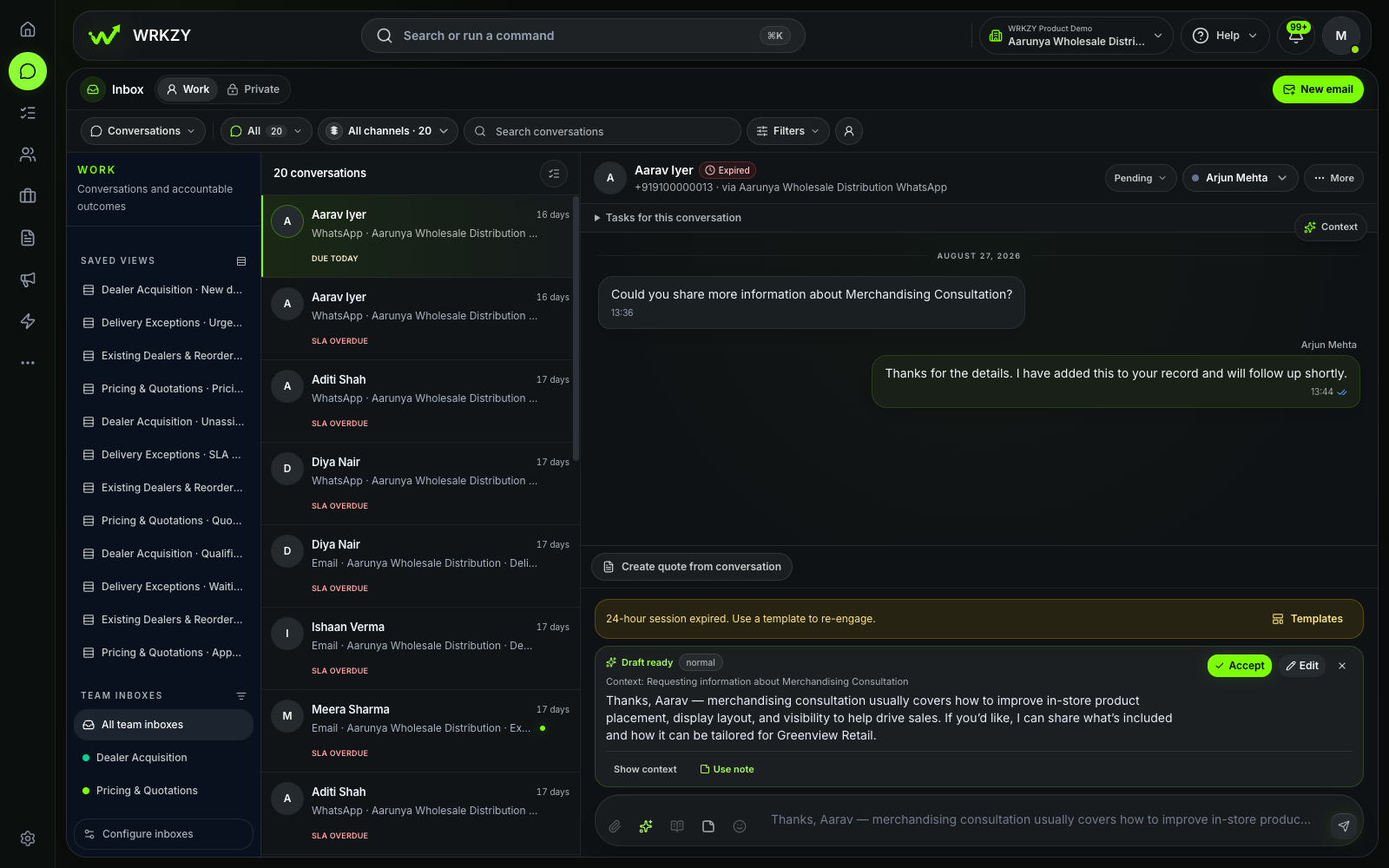 Current productAI-assisted draft under human reviewOpen larger ↗
Evidence boundaryThis capture shows a draft awaiting human review; it does not show that the suggestion was accepted, sent or factually correct.
Trust needs more than a feeling. Pick one recurring task and watch the time to decision, edits before use, evidence coverage and repeated corrections. A high acceptance rate means little if reviewers are missing unsupported claims. A slower review may be doing valuable work if it catches stale context before somebody makes a customer commitment.
Operators can use the Help Center guide to review an AI-assisted summary or draft. Workspace Owners and Admins should also configure AI capabilities and context access before expanding use.
A long workflow is not necessarily an AI agent
A deterministic workflow can perform several actions without becoming an agent. For example, a New Contact Created trigger can add an approved tag, add the contact to a defined list, and assign the related conversation. The team chose the path before the event occurred; the workflow executes that path.
The controls differ because the freedom differs. A configured automation needs narrow eligibility, understandable steps, test coverage, release approval, run evidence and recovery. An agent also needs enforceable rules for choosing tools and intermediate actions while it pursues a goal.
WRKZY keeps these promises separate: configured automations execute reviewed team rules, while AI assistance prepares reviewable work for a person. Neither should be described as an autonomous relationship manager.
AI agents need clear limits and human oversight
A future agent-ready workflow needs an explicit operating contract:
- the outcome it may pursue;
- the records and tools it may access;
- the actions it may take without approval;
- the thresholds that require human review;
- the time or event that ends its authority;
- the evidence and history it must leave; and
- the owner who can pause, correct, or take over.
These controls must be enforced by the product and workflow, not left as polite suggestions inside instructions. A prompt can describe a boundary; the surrounding system has to make that boundary real.
Begin with the awkward handoff
Teams naturally design the happy path first: the information is complete, the tool responds, and the request fits the expected pattern. Real customer work eventually supplies the awkward case.
Before expanding authority, define how the system reports missing context, conflicting instructions, provider limitations, failed actions, and outcomes outside its scope. A useful handoff should leave:
- the objective it was pursuing;
- the actions already attempted;
- the source context and permissions used;
- the current customer and workflow state;
- the unresolved point; and
- the recommended human decision.
The responsible person should inherit the work, not a mystery.
For implementation sequencing, the 30-day CRM checklist deliberately puts narrow automation after the team has tested ownership, channels, and failure paths.
Choose based on who should make the decision
If you are evaluating the current product, explore WRKZY AI assistance and look for a clean separation between source context, a reviewable suggestion and the final action.
If you operate the work, use the AI-assisted review guide. If you own workspace policy, start with AI controls and context access. If the work is predictable enough to encode in advance, move to WRKZY automations instead of treating a deterministic rule as an agent.