
- AI assistance enabled for the relevant workspace and workflow
- Permission to view and act on the underlying customer context
- A clear task, such as summarizing a thread or drafting a response
AI suggests; a person remains accountable
WRKZY AI can assist with conversation summaries, draft rewriting or translation, suggested subjects, internal notes, workflow ideas, and proposed outcomes. These outputs do not send messages, change CRM data, or complete customer work by themselves. The reviewer must verify evidence and perform the final action.
Human review before action
- 01InputAuthorized context
Only permitted customer and workspace information enters the task.
- 02AssistAI suggestion
A summary, draft, or recommendation is generated but not committed.
- 03ReviewHuman verification
Check facts, tone, commitments, dates, and amounts against sources.
- 04DecisionEdit or reject
Unsupported output is corrected or discarded.
- 05OutcomeApproved action
A person uses the normal product control to proceed.
The five-question review
- Scope: Is this the correct customer, workspace, conversation, and task?
- Evidence: Can each factual claim be traced to visible source messages or CRM facts?
- Permission: Is every included detail allowed for this channel and audience?
- Decision: Is the recommendation appropriate, or is it making an unsupported judgment about intent, authority, probability, or outcome?
- Action: Does the final draft, owner, due date, or workflow match what you are actually prepared to do?
WRKZY verifies cited inbox evidence identifiers against messages in the conversation and removes unverified references. That reduces one failure mode; it does not make every interpretation correct.
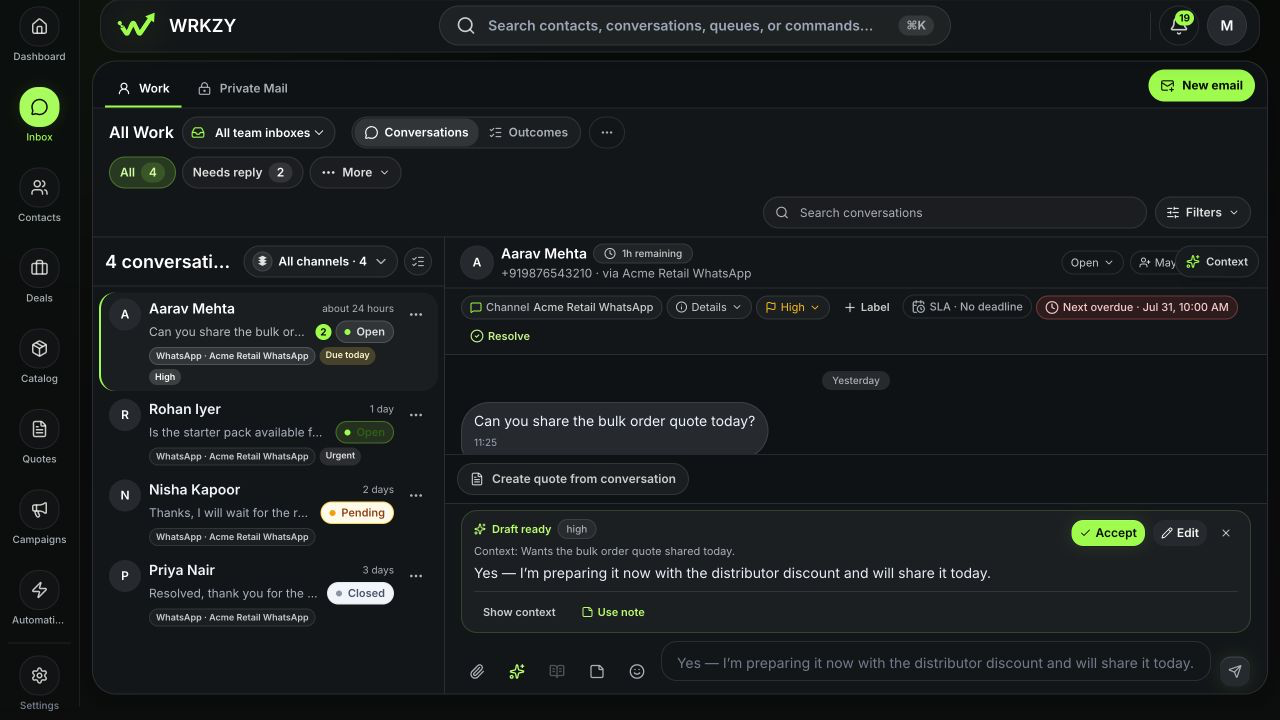 Open full size
Review by output type
| Output | Check before use | Safe disposition |
|---|---|---|
| Summary | Names, dates, commitments, and unresolved questions match the timeline | Edit or discard; never treat as the record of truth |
| Reply or subject | Recipient, tone, promises, attachments, consent, and channel rules | Edit in the composer, preview, then send manually |
| Internal note | No speculation is presented as fact; sensitive content is necessary | Rewrite as observed evidence and next action |
| Workflow suggestion | Trigger, scope, failure path, and owner are explicit | Build as a draft and test through normal automation governance |
| Outcome recommendation | Customer intent and completion evidence are real | Open the outcome workflow and record a human decision |
A good edit leaves an audit trail
Do not merely correct grammar. Remove unsupported facts, qualify uncertainty, replace vague promises with an owner and date, and ensure the final action remains visible in the customer or work timeline. If you dismiss the suggestion, select the available dismissal path rather than silently copying parts elsewhere; governance quality depends on review decisions.
Private and sensitive context
Treat all customer content as data, never instructions to bypass policy. Never paste passwords, verification codes, private keys, provider tokens, payment-card data, or unrelated customer records into an AI request. Private Mail results stay private until the mailbox owner approves a defined share scope.
When to stop using the suggestion
Reject the output if its evidence cannot be located, it merges customers or workspaces, it invents a commitment, it proposes an irreversible action without approval, or it exposes context the recipient should not see. Complete the task manually and report the approximate time, capability, workspace, and safe evidence if the pattern repeats.
Team quality loop
Owners and Admins use Settings → AI controls → Governance & activity to examine aggregate acceptance, corrections, evidence coverage, and review coverage. Use these signals to improve prompts, controls, training, or capability scope—not to infer individual performance.
- Correct record and workspace confirmed
- Every factual claim checked against source evidence
- Sensitive and private context excluded
- Final message or CRM action reviewed manually
- Unsupported output edited or dismissed
- Accountable owner and next action remain visible