

Two quotations can look identical as PDFs and carry very different levels of risk.
In one case, the salesperson selected current products, confirmed the buyer, obtained the required approval and sent a controlled version linked to the opportunity. In the other, somebody copied last month’s spreadsheet, changed the total, saved “FINAL-2.pdf” and sent it from a personal chat.
The customer sees two professional documents. The business has only one reliable commercial record.
Quotation software should do more than make attractive PDFs. It should help a sales team construct the right offer, govern material changes, deliver the current version and turn the buyer’s response into owned work.
Begin with the decision your buyer must make
A quote exists so a buyer can understand and respond to a specific offer. Before comparing software, write down what that decision requires in your business:
- the correct legal or trading name of the buyer;
- products, services, scope and quantities;
- prices, discounts, tax treatment and total;
- delivery or implementation assumptions;
- validity, payment terms and exclusions;
- internal approval where required;
- a clear current version; and
- a supported path to ask, revise, accept or decline.
The exact fields vary by company. A machinery distributor, marketing agency and facilities contractor do not quote the same way. The software should give each team appropriate structure without pretending to replace accounting, tax or legal judgment.
- 01Buyer contextCorrect customer and opportunity
- 02Controlled offerReviewed scope, price, tax, and terms
- 03Approval and versionCurrent state and preserved history
- 04Buyer decisionQuestion, change, acceptance, or decline
- 05Commercial handoffNamed owner for what follows
The 10-capability quotation software matrix
Rate each capability essential, useful or not required now before you see product demonstrations. Then score vendors against evidence.
| Capability | What good support looks like | Demonstration test |
|---|---|---|
| 1. Buyer context | Contact, company and opportunity are connected to the offer | Open the customer record and find the current quote without searching filenames |
| 2. Reusable catalogue | Reviewed products and services can be selected consistently | Change a catalogue record and explain how existing quotes are preserved |
| 3. Commercial construction | Quantities, prices, discounts, tax and totals are understandable | Build one of your real offer shapes, including optional or packaged lines |
| 4. Terms and presentation | Validity, payment, scope, notes and brand are buyer-readable | Preview the exact customer view on desktop and mobile |
| 5. Approval control | Defined changes can require review by an authorised person | Trigger, reject, revise and re-submit an approval case |
| 6. Version lineage | Revisions remain connected and older offers are not silently overwritten | Change scope after sending and show both commercial states |
| 7. Controlled delivery | The team knows what was sent, to whom, when and through which supported path | Send a test quote and inspect provider and timeline evidence |
| 8. Buyer response | Questions, change requests, acceptance and decline remain distinct | Submit each response and show the resulting internal work |
| 9. Follow-through | A response creates or updates accountable next actions | Move from accepted or revised quote to the next owner and due action |
| 10. Governance and portability | Permissions, audit context and export paths are clear | Restrict a user, export a record and explain retention and exit handling |
A vendor may excel at document design and remain weak at approval, versioning or follow-up. Weight the matrix according to the cost of error in your operation.
India-specific checks that belong in the demonstration
A quotation is not the same record as a tax invoice. The distinction matters because a polished proposal can still create rework when finance has to rebuild the customer, item and tax information later.
Use one genuine offer shape and ask the vendor to show:
- where the seller records the buyer’s legal or trading name, billing and delivery details, GSTIN when relevant, and the state or place-of-supply information your process needs;
- how catalogue items carry descriptions, units, HSN or SAC information and tax treatment without forcing the salesperson to make tax judgments during every quote;
- how CGST, SGST, IGST or other applicable tax lines are represented and who is allowed to change them;
- whether INR is the default while foreign-currency quotations remain possible where the business needs them;
- how a reviewed quotation becomes an invoice or accounting entry in Tally or another approved system without losing the accepted scope, version and buyer identity; and
- whether quote numbering, validity, bank or payment instructions and company details follow your approved commercial template.
The CBIC tax-invoice rules describe particulars required on tax invoices, including supplier and recipient information, descriptions, values, tax rates and place of supply in relevant cases. They do not make a quotation product a tax engine. Ask your finance or tax adviser which fields must be captured before acceptance and which system remains authoritative after it.
Examine how the quote is built
Reliable offers begin with controlled inputs. The software should help a seller choose the correct customer and commercial context before adding line items. Reusable catalogue records can reduce retyping, but they should not remove judgment about buyer-specific prices, quantity, currency, validity or scope.
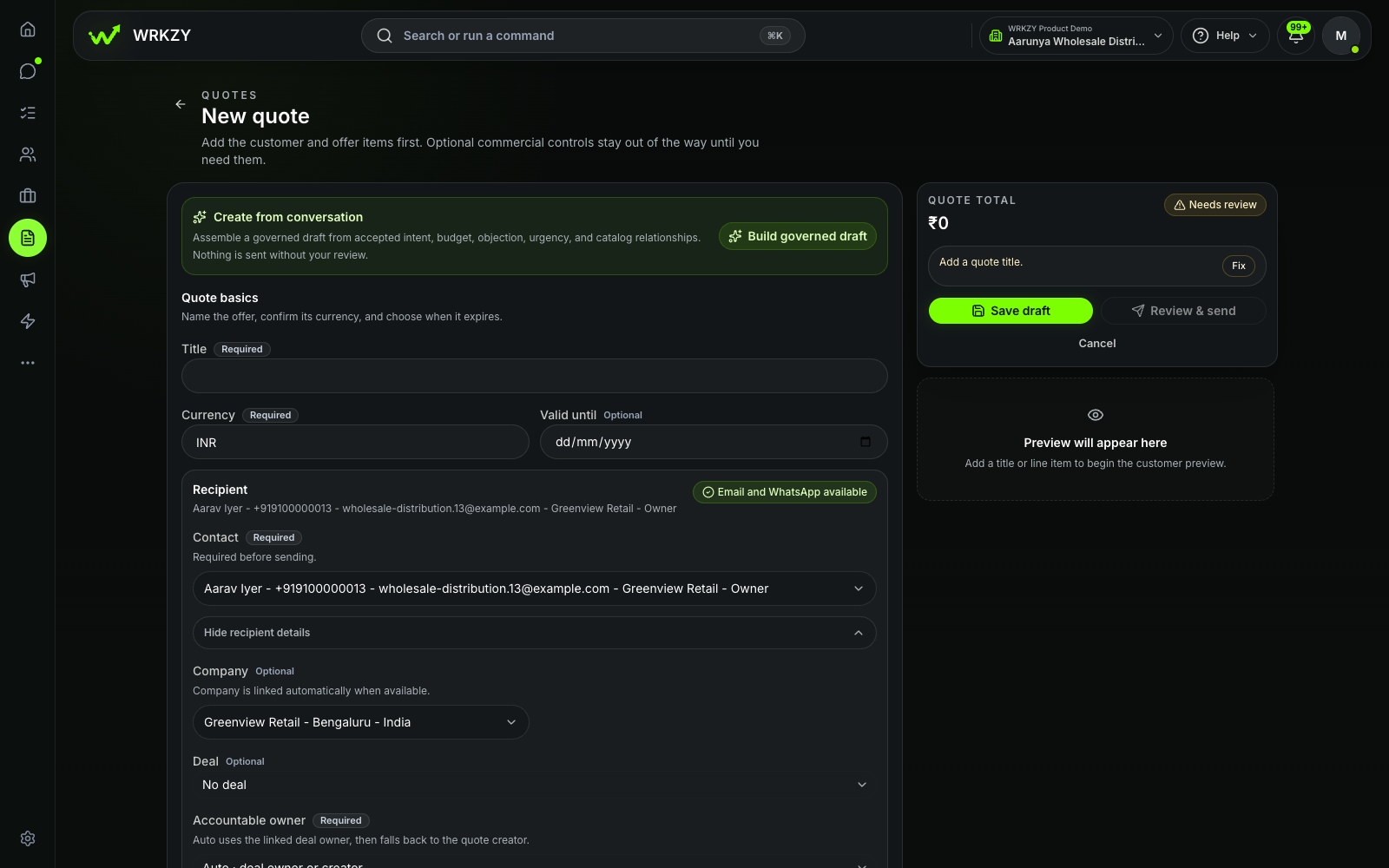 Current productGoverned quote draft with buyer contextOpen larger ↗
Evidence boundaryThis capture shows an unsaved draft and available controls; it does not show that a quote was saved, sent or accepted.
Ask the demonstrator to build one ordinary quote and one awkward one. The awkward example might include an optional service, a special price requiring review, delivery exclusions and a buyer request for two alternatives. That reveals whether the product models your commercial work or merely produces a document.
The preview also matters. The customer should be able to distinguish inclusions, options, quantities, taxes, total, validity and important terms without calling the salesperson to decode the layout.
Approval must attach to a commercial state
“Approved by finance” is meaningful only if the business can identify what finance reviewed.
Good approval handling preserves the reviewed buyer, scope, price, discount, tax, total and terms. If one of those changes materially, the system should make the new state visible and apply the company’s approval rule again where required.
Look for:
- clear approval thresholds and authorised roles;
- a reason when an offer is rejected or returned;
- an identifiable reviewed snapshot;
- controls against sending an unapproved state; and
- history that remains understandable months later.
Do not assume software can decide whether a transaction complies with your tax, contracting or delegation rules. Those rules must come from the business and its advisers. The software’s job is to apply the configured workflow consistently and preserve useful evidence.
Revisions should preserve history
A buyer may change quantity, timing, scope or commercial terms. The team needs a new current offer without erasing the old one.
Avoid a process based on duplicated files named “final,” “latest” and “latest-final.” Look for connected revision lineage: what changed, which version was current, whether it required another approval and which version received the buyer’s response.
This protects both the customer experience and internal clarity. A buyer who opens an older path should not unknowingly act on a superseded offer. A salesperson reviewing the account should not have to infer history from timestamps and filenames.
The full journey is described in the workflow from customer enquiry to accepted quote.
Sending is not the same as delivery or acceptance
Quotation systems often compress several states into “sent.” Keep them separate:
- the quote was prepared;
- the required review was recorded;
- a current buyer-facing version was created;
- a provider send was attempted;
- the provider reported delivery;
- the buyer viewed the offer; and
- the buyer submitted a response.
Each state is evidence of one thing, not everything after it. A delivered message does not prove it was read. A view does not prove purchase intent. Acceptance does not prove payment or fulfilment.
During evaluation, ask the vendor to show a failed email or WhatsApp delivery, an expired quote and a customer question. Inspect what the seller sees and which next action is created.
If the system shares through WhatsApp, confirm that the implementation follows the current WhatsApp Business Messaging Policy and your organisation’s consent practices. Channel convenience does not remove channel responsibility.
Connect the response to the next owner
The quote is not complete when the PDF leaves the building. A buyer response should update the commercial work around it.
- A question needs a response owner and due point.
- A change request needs a controlled revision and, where required, renewed approval.
- A decline should record the reason and inform the opportunity honestly.
- An acceptance needs a deliberate handover to the next process, such as order confirmation, onboarding, delivery planning or invoicing in the approved system.
No quotation product can define that downstream operation for you. Map the handoff during implementation and name the system of record for each later step.
Questions for the final vendor review
Ask the shortlisted provider to answer these in writing:
- What buyer, line-item and tax fields are supported, and which require configuration?
- How are catalogue changes separated from existing offers?
- What exactly triggers approval, and what is preserved as evidence?
- Can employees modify or send a quote while approval is pending?
- How are revisions, superseded offers and buyer responses connected?
- Which delivery channels are supported, and what provider states are visible?
- What can the buyer do without creating an account?
- How do permissions, exports and audit history work?
- Which accounting, invoicing or ERP steps remain outside the product?
- What costs apply beyond user licences?
Document any boundary the vendor cannot demonstrate. Honest boundaries are safer than broad claims that leave implementation teams to discover the truth later.
Run five quotes before committing
Use five anonymised recent offers: a standard quote, a discount case, a revision, an expired offer and a multi-option proposal. Ask sales, finance and operations to complete their real parts of the process.
Review accuracy, effort, control and the clarity of the buyer view. Then inspect whether a colleague can reconstruct what happened without opening a private chat or asking the original salesperson.
The winning product should make the commercial decision clearer for the buyer and the responsibility clearer for the team.
Explore WRKZY Quotes from buyer context to governed response.